
How To Use VoIP to Watch Soccer at the World Cup (and stay employed in the process)
Posted on June 26, 2018 by Dan Quick
 Every four years, the most important global sporting event is staged. I’m not talking about the Olympics, but rather the World Cup. This weeks-long tournament is preceded by months, and even years, of qualifications where countries all over the world hope to punch their ticket to the biggest stage in sports. Unfortunately, you may not be aware of this because, like the majority of our audience, you may happen to find yourself somewhere in the United States of America at the moment. That’s an issue for our national awareness of the tournament (as evidenced by the 40% decrease in Americans who watch soccer compared to 2014) mostly credited to the fact that the United States failed to qualify for the first time since 1986. That’s even longer than we’ve been in business>, which as you know, is a really long time. As lamentable of a result as the US’s failure to qualify really is, it would be disingenuous to say we aren’t still pretty ravenous about the tournament over here at VirtualPBX. And why shouldn’t we be? Not only are we people who like to travel the world and experience new places and cultures, we’re also a truly global company with team members and customers scattered across the planet. In that sense, we really couldn’t miss the event if we tried. For many other organizations, though, following the excitement from halfway around the world can cause complications with their work schedules. That’s why we’ve compiled the best ways to use VoIP to make sure you can stay plugged into the action all while staying employed along the way.
Use VoIP, Watch Soccer
The reality is that we’ve got a lot of freedom with our days because, as a distributed workforce, the responsibility is on us to make sure we’re producing at the levels we need to get the job done. When that’s the case, we can prioritize our time to include family responsibilities, personal needs, community involvement, and when the time is suitable, even a little world-class soccer. For those who aren’t as accustomed to this permissive scenario, we’ve offer the following tips on how to watch soccer using VoIP for the remainder of the tournament.
- Follow Me Calling Follow Me Calling is the intelligent call forwarding system that allows employees to include a series of telephone numbers that will ring to find you wherever you go. So setting the cascade of numbers from your desk phone, cell phone, favorite sports bar, and soccer club hangout is, in this instance, totally acceptable.
- Auto Attendant Adding an Auto Attendant is the best way to keep operations working smoothly during any heighted period of activity, be it during a busy project or a non-stop soccer watching marathon. Auto Attendants act as a virtual receptionist that can take incoming calls, play recorded messages, and route them through to their desired parties or voice mailboxes. Basically, this is the person who is going to cover for you when you’re not at your desk because you’re away watching a game.
- Business Hours Automating the business hours, lunch periods, and corporate holidays for your business is a great idea because nobody wants to have the sense of dread that they may have forgotten to turn on voicemail and out of office reminders once they’ve already left for vacation. Setting office hours also comes in handy when all the above suggestions just aren’t good enough so you have to make a new holiday to get away to watch your favorite team. We haven’t done that, yet, but we reserve the right to do so.
Watch Soccer, Even if it’s on Tape Delay
We’re normally not too likely to prescribe behavior to anyone, anywhere. We figure that whoever you are, whatever you do, is enough. However, one thing that is difficult to overstate is the importance of having shared experiences, especially when those experiences are shared with our neighbors not just next door, but also across the world. That’s what the World Cup is and that’s what it means to us. Hopefully, you can use some of these tips to get away from the desk for a few minutes to watch a game, but even if you want to watch the tape-delayed events later on in the evening after work is over with, chances are good you’ll walk away having been entertained, impressed, and a little more connected with the world than you may have started. Also, if you have any other suggestions on how watch the games, or if you just want to shoot the breeze about your favorite players and teams, hit us up on Twitter or Facebook, because we’re always more than happy to do that, too!
VirtualPBX Guest Blog: Best Practices In Securing Unified Communications
Posted on June 21, 2018 by Dan Quick
For our Partner Blog Series we like to highlight the relationships we have with our peers and business partners from across all areas of the telecommunications industry. We know that when it comes to relationships, the whole really is greater than the sum of the parts. That’s why we want to share with you the wisdom, experience, and perspective of the companies we work with.
 For this edition of the VirtualPBX Partner Blog Series, we tap into the decades of network security experience of Sorell Slaymaker from Unified IT Systems. Sorell is an expert in the areas of risk assessment, network configuration, and general data security best practices in the cloud communications space. He has written extensively on these topics and today contributes the following guidelines for securing unified communications.
Best Practices In Securing Unified Communications
Unifed Communications (UC) applications can be the hardest to secure within an enterprise. UC clients, APIs, and services need a full security suite to ensure an enterprise stays secure. Too many enterprises attempt to apply standard application security measures to UC applications, which limit what users can do and still leaves enterprises exposed to the complex UC security challenges. Security managers and architects understand standard web applications, but not all the nuances of UC, and UC managers and architects lack the sophisticated security understanding.
Framing the Challenges of UC Security
One example is when Cisco’s Webex reported a critical security vulnerability that needed an immediate patch. An authenticated, remote attacker could execute arbitrary code on a targeted system due to insufficient input validation by the Cisco WebEx clients. The risks to a company if their UC system(s) is not secure include:
- Loss of Data – UC is more than voice and video, there is a lot of data associated with Web conferencing and file sharing.
- Back Doors – Bad actors can bypass standard security controls to gain access to private networks.
- User Tracking – Using Meta-data regarding the communication to track who is talking to whom, when, and where, even if the media is encrypted.
- Blackmail – Recording private conversations and threating to make the information public.
Increasingly Common Risks
UC combines telephony, video, chat, email, and presence together into one unified communications system. As the technology has become more complex and more accessible from the public internet, the security threat has increased. In many ways, it’s easier than ever to attack business communications. Companies must be diligent to protect their communications as they are vital to business operations.
Companies formerly relied on their internal network being secure and required external users to use a VPN solution to get in. This strategy may no longer work for all businesses because:
- No network is secure – It is been proven that the top vector for attacks come from inside the enterprise network.
- BYOD – (Bring Your Own Device) UC from personally owned devices including employees, contractors, partners who do not have a VPN or MDM client software protections.
- Speed – Users want to immediately start communicating versus having to wait for a VPN tunnel to be established.
- Public UCaaS – Hosting UC externally at a 3rd party using internet network connectivity is common, especially with the rise of freemium solutions.
- WebRTC – Supporting standardized clientless UC anywhere and everywhere.
Overcoming Common Challenges
While large businesses can often dedicate substantial resources toward securing their communications, SMB’s need simple and cost-effective solutions. Failure to secure UC can lead to information and data theft. UC is hard to secure for the following reasons:
- Peer-to-peer – WebRTC and proprietary UC stacks allow one device to talk directly to another without going through a centralized service and security stack. All other applications are client/server based, where a security stack can reside at the server.
- Bi-Directional – Sessions can be established in both directions due to the call/calling nature of UC versus a web application where a user establishes the session request. A home router, for instance, has a simple firewall rule that states all TCP & UDP sessions must be initiated from within the home network and why to get a Skype call, the home user first must be logged into Skype.
- UDP Transport – Unlike TCP that has sequence numbers and specific ports for different types of applications, UDP has neither. Different vendors open up a range of UDP ports and UC sessions cycle through the range of ports. The range of ports must be bigger than the peak number of concurrent UC users.
- Multiple services – Voice, video, chat, data – UC uses a range of services, each with their own TCP/UDP port. With conferencing, there can be hundreds of users interacting both inside and external to the organization.
- Jitter Sensitivity – Jitter is the variation in latency, and jitter above 20ms will result in the effective loss of real-time voice/video traffic. With video conferencing, there can be instantaneous spikes in network traffic that are 100x the norm. Firewalls and other security appliances have trouble processing a lot of UC traffic without causing jitter. The primary reason why UC was the last major application to use virtualized infrastructure at scale is due to this.
- Remote control – Co-browsing and taking remote control of an end-device are some of the enhanced features of UC suites. Many vendors use this to circumvent VPN and other types of supported enterprise remote access.
- APIs – The digital world is about getting and sharing data through APIs. Set up a secure, encrypted session and information goes in and out of an organization. The challenge is that some of this data can be private, confidential, and/or regulated data that require enterprise governance and compliance.
- Too Many Proprietary Appliances – Legacy PBX, voice mail, conferencing systems use proprietary hardware with non-common operating systems. These appliances are subject to known security vulnerabilities.
Finding the Solutions for Every System
While this list can be overwhelming, there are best practices to follow regarding security UC. These include:
- Encrypt Everything – It is no longer good enough to just encrypt data at rest, data and communication in motion must be encrypted because users and applications can be anywhere and everywhere. Use 256-bit encryption on sensitive data and communications. For instance, using 128-bit encryption still allows someone to understand if it is a male or female talking, what language, how long the conversation is and the interaction amount between users.
- Adopt Zero Trust Architecture – Zero Trust means that nothing on the network, resource, or application is trusted. A deny all policy, with a whitelist that is integrated with the identity and access management systems. Use anomaly detection to alert when something abnormal is occurring.
- Ensure Identity – Great security starts with great identity and access management. Multi-factor authentication, least privilege access, and good logs to account for who accessed what are industry best practices that are not always applied to UC. Password management for voice mail and other services should be multi-factor and require 2-factor tokens for system administrators. The password reset process should also be rigorous.
Really all proxy services need to be examined, as well. While web and email proxies are common and SBCs act, as one of their functions, as a voice proxy. Be sure to add chat/presence and video proxies. Unfortunately, these proxies are proprietary. A few examples Microsoft has their Edge & Reverse proxies, Cisco uses Expressway. These proxies provide the following features:
- Packet Inspection – Unencrypt each session and inspect the signaling packets and scan each packet and stream.
- Secure Firewall Transversal – Set up specific TCP ports to go through a firewall and handle the NAT required at both layer 3 and layer 5.
- Log & Alarm – Gather a log of all sessions and generate real-time alerts when there are anomalies such as a spike in traffic, malware detection, multiple session failed attempts, etcetera.
- DLP – When required, record the session – Important for screen share logging.
For WebRTC, a WebRTC Gateway with ICE, STUN and TURN services used as appropriate. To add to this list, with the use the Communication Platform as a Service (CPaaS), all API’s should also have a proxy so an enterprise can enforce governance and compliance of all data going in and out of the organization.
- Securing the UC appliances – Scanning on a regular basis and applying vendor security patches immediately, plus turning off unused services. While this may seem obvious, many enterprises fail to do this as their UC infrastructure does not always reside in the security managed part of the data center.
- Log & event monitoring – Every large enterprise has Security Information and Event Management system. The UC systems should tie into this.
- Audit – While all large enterprises and government agencies get 3rd party audits of their critical or sensitive transactions, this is rarely done for interactions. Getting a 3rd party to audit UC security and interactions is an emerging best practice.
- Training – No matter how secure your systems are, users can be lazy and not take security seriously. If they or the people they are talking to are on an unsecured session, confidential, private, or regulated information should not be shared.
Hackers are becoming like spies and getting more sophisticated and targeting employees, contractors, and partners to help them infiltrate an organization. Everything in an organization needs to be locked down tightly, including UC applications. And for IT security professionals, a security breach into systems that you are responsible for will more than likely result in you updating your resume.
So what do you think? Does your enterprise already conduct all of these steps to protect itself from bad actors and security breaches? Do you think there are other critical steps that we didn’t cover here? Let us know by joining the conversation on Facebook or Twitter, and we’ll make sure to include it in future editions of the VirtualPBX Partner Blog Series!
VoIP Can Give Your Business the Best Automated Phone Tree
Posted on June 19, 2018 by Dan Quick
 An automated phone tree is a menu-based telephone system that routes callers to individuals, departments, and voicemail. Our version, the VirtualPBX Auto Attendant, comes will all our Business Phone Plans.
Well into the 20th century, phone trees were staffed by live receptionists. Efficiency gains in telephony systems and the advent of Voice Over IP (VoIP) phone plans helped change that manual task into an automated one. By the late in that century, businesses with high call traffic and expansive departmental organization could easily program their own calling menus to properly guide any inbound caller.
Putting the Auto into Automated Phone Tree
An automated phone tree’s core function is to direct callers to appropriate parties.
On its own, the Auto Attendant can help callers navigate to a specific point — such as an user’s desk phone. This is useful, but somewhat limited when the caller should reach a group or may have a concern that multiple company employees could address.
That’s why our Auto Attendant can pair with the ACD Queues and Ring Groups features of our phone plans. Those extra tools help the Attendant handle the complex routing requirements of modern organizations without the costs associated with older, traditional phone systems.
- ACD Queues are highly customizable call routing systems that can designate more than just the group or party an inbound call should be directed to. Additionally, ACD Queues can also throttle the pace of distribution and designate the sequence of agents who will answer calls. It also makes use of skills-based and overflow oriented call routing logic to move calls to the appropriate individual. ACD Queues can be purchased as an add-on to our phone plans.
- Ring Groups collect employees together — such as by department (Sales) or standing (C-Suite) — to complement the function of an automated phone tree. The Auto Attendant can reach a specific Ring Group, and the call may ring persons in that group sequentially or in tandem. Unlike ACD Queues, Ring Groups do not use logic to route calls; they’re only adjustable by static choices, such as ringing one person before the next. Hunt Groups are included with all VirtualPBX Business Phone Plans.
Getting Started With an Automated Phone Tree
Even though the combination of an Auto Attendant and either ACD Queues or Hunt Groups make for a formidable inbound call strategy, using them does not preclude an organization from having a live receptionist. In fact, the opportunities to use these technologies to enhance and improve the impact that having a live receptionist has on an organization are greater than the using them on their own. Plus, getting started is easy considering that all VirtualPBX VoIP Plans come with a 15-day money back guarantee. So what are you waiting for? Get automated phone trees for your office and see how they can help your business, today!
The Ways How Building Open Source Software is Like Baking a Cake
Posted on June 15, 2018 by Dan Quick
 We recently launched the all-new and totally free to acquire VirtualPBX Web Phone for all of our Dash Service Plan account holders to use. This was a big deal for our customers and us because it was the first time that open-source WebRTC (Web-Based Real-Time Communications) software was used to create such a powerful telecommunications device that was being made freely available to the hosted PBX community. We’re rather proud of the Web Phone for both its formidable performance and durable reliability as much as we are for the fact that we’re literally giving it away to anyone who wants to use it. Since its debut earlier this year, however, we’ve been getting lots of questions about how it was made, how we can offer it for free, and general questions about what features users would be losing out on by using it. The short answer to that is that anyone on a VirtualPBX VoIP plan will get 100% parity on the feature set on the VirtualPBX Web Phone as they would on even the highest quality VoIP Desk Phone. We understand the skepticism, though, honestly. We have so many people who make the switch to VirtualPBX from other services that promise a lot and deliver a little that it’s entirely understandable why some people may be wary to accept something that is promised to be so impressive, much less that it’s being offered for free. To address some of the apprehension, we’ve tapped one of our engineering rockstars to explain WebRTC and Open-Source Software but still we’ve decided to make it even more approachable with a new analogy. And it’s one that I think is close to almost everyone’s heart; cake.
Open Source Software As a Cookbook
First of all, who doesn’t love cakes, right? There’s a reason cake is ubiquitous at birthday celebrations and that’s because, while we may have disagreements about the flavors or icing, it’s pretty tough to go wrong with a fat slice of cake. And how is our new Web Phone like a birthday cake? Well, just like the spongy goodness of a cake, the VirtualPBX Web Phone shares a variety of similarities.
- Our new web phone is comprised of a balanced apportionment of carefully selected ingredients. Too much tech and not enough UX design can leave a similarly bad taste to a cake baked with too much rising agent that may have a lot of volume to it, but the aftertaste is something that people may not care for.
- Choosing the right platforms to be compatible with (ie, being immediately optimized for all modern web browsers) is also a lot like picking the style of cake layers. A multi-tiered and festooned piece of bakery may look good, but is it something that works for everyone? Not likely. From a reliability standpoint, a simple sheet cake is what you’d need to make sure that anyone, anywhere would be able to, sink their teeth into, a new web phone.
- And, of course, one of the most obvious of similarities between cakes and the VirtualPBX Web Phone is that they each can be universally popular assuming the recipe is followed to the tee. This is great for our users because we host and manage all of the necessary technology behind the web phone in the cloud which means that they can rest assured that the recipe is right 100% of the time. Because you know the secret to making perfect Tollhouse Chocolate Chip cookies, don’t you? It’s following the recipe perfectly.
Use Our Open Source Software as Much as You Want
Here’s another similarity between great cooking and great open source software; when people make something incredible, they want to share it with everyone else. Just like you can find recipes from amateur and professional chefs being freely given away across the web, we’re also happy to provide our web phone totally free of charge. That means that you can have as many of these as you want on as many devices and for all of your employees and the cost will always be zero dollars and no cents. The VirtualPBX Web Phone operates reliably on any modern web browser on any web-enabled device, phone, tablet, or computer. The only thing you pay for is the use of your Dash Service Plan, and your pooled minutes are drawn from each user in the exact same way they always had been. Now, the only thing that changes is you get the industry’s best and, ahem, freshest web phone technology for all of your employees totally free. No more buying and provisioning VoIP phones, no more paying licensing fees for softphone applications, and way more budget left over for, if we have anything to say about it, cake. You can’t always eat as much cake as you’d like, but with the VirtualPBX Web Phone and a Dash Service Plan you can at least have your cake and eat it, too!
Phone Receptionist with Cloud Communications
Posted on June 12, 2018 by Dan Quick
 A phone receptionist is often times the first and most commonly encountered employees at a company. Being the point person on the front lines of a business’ telephone traffic definitely puts an individual in contact with a lot of the public, but how a phone receptionist works has changed with the proliferation of modern telecommunications technology. While the tools he or she uses to accomplish the task of answering, transferring, and forwarding calls may have changed, however, the essential value of a phone receptionist has remained just as high.
The Original Phone Receptionist
As we can all imagine with the images of bays and bays of operators working a switchboard in the office buildings of yesteryear, the function of a live receptionist has always been, well, lively. This has always been the lot of the phone receptionist, irrespective of what the industry or size of an organization he or she worked for. That’s because regardless of the amount of traffic that comes across the desk, or phone line, of a phone receptionist, the importance of it all does not waver. Being a triage nurse or sorts, a phone receptionist has historically played a role in which determinations need to be made about a host of topics. Everything from locating the correct parties to receive inbound calls, assessing callers’ needs and escalating as necessary, to even gatekeeping access to members of a leadership team all are responsibilities that fall at the feet of a phone receptionist. This has largely remained unchanged throughout the years, though advances in telephone system technology have shaped how all of these tasks get completed.
The Super Charged Phone Receptionist
Today, with the benefits of faster, leaner, and simpler voice communications technology like VoIP, a phone receptionist can effectively be at more than one place at the same time. This is accomplished across several fronts, many of which stem from the multi-faceted benefits of an Auto Attendant, the virtual receptionist that comes with the award-winning Dash Business VoIP Plans. VoIP (Voice Over Internet Protocol) is an advantage to any phone receptionist because it allows him or her to “park” calls to be handled by a team of potential recipients rather than simply taking a message. Also, by nature of being hosted in the cloud and not tethered to physical wires, a hosted phone plan allows phone receptionists to move from location to location, permitting them to get more done than when they had to be stationed at a desk to field a call. This mobility can be accomplished a variety of ways, intra-office moves can be executed with a Hot Desk from desk to desk for example. This doesn’t even begin to scratch the surface of what all an Auto Attendant or a virtual receptionist can do to enhance the work of a phone receptionist. Suffice to say, however, anything that can help one of a company’s most important employees be better and more efficient at their job is something that should be investigated by any organization. Auto Attendants powered by Dash VoIP Plans are and do exactly that.
What You Need to Know About Having a Live Receptionist With VoIP
Posted on June 7, 2018 by Dan Quick
 A live receptionist is often the first line of contact for a business with its customers, and needs to possess a wide range of institutional knowledge to field calls, answer questions, and direct topics to their best possible outcome. The importance of having the right person in this role underscores the commonly held notion that a business’s greatest assets are the people who work there. Certainly, we’ve had a lot of fun investing in our human capital, ourselves, because we also attribute our growth and success to the hard work and irreplaceable personalities that make VirtualPBX who we are. Combine that idea with the old adage that you never get a second chance to make a first impression, and you’ve got a situation whereby the front lines employees are staggeringly important to the success of an organization. Many of our customers are small, scrappy, and resourceful entrepreneurs who handle every aspect, from the front of the house to the back, on their own. But other companies with a few more employees make one of their first hires an administrator who can handle the logistics of an office. This person ends up with plenty of responsibilities, and more often than not those include acting as the live receptionist for all inbound calls. There is really no replacement for the personality that some of my favorite administrators have and how that, in turn, elevates the brand they represent.
That’s why many organizations also have anxiety over bringing in an advanced business telephone service like feature-rich hosted VoIP for fear of them losing the need for a live receptionist altogether. Even though some businesses enjoy employing an Auto Attendant in lieu of a live receptionist, mandating that never has to be the case. Over the course of this post we’ll illustrate how a live receptionist and an Auto Attendant are not mutually exclusive and can, in fact, complement each other quite nicely. There are several compositions this can take, too, each of which provides specific support for live receptionists only, exclusive use of Auto Attendants, and any number of hybridizations of the two.
Having A VoIP Plan With a Live Receptionist
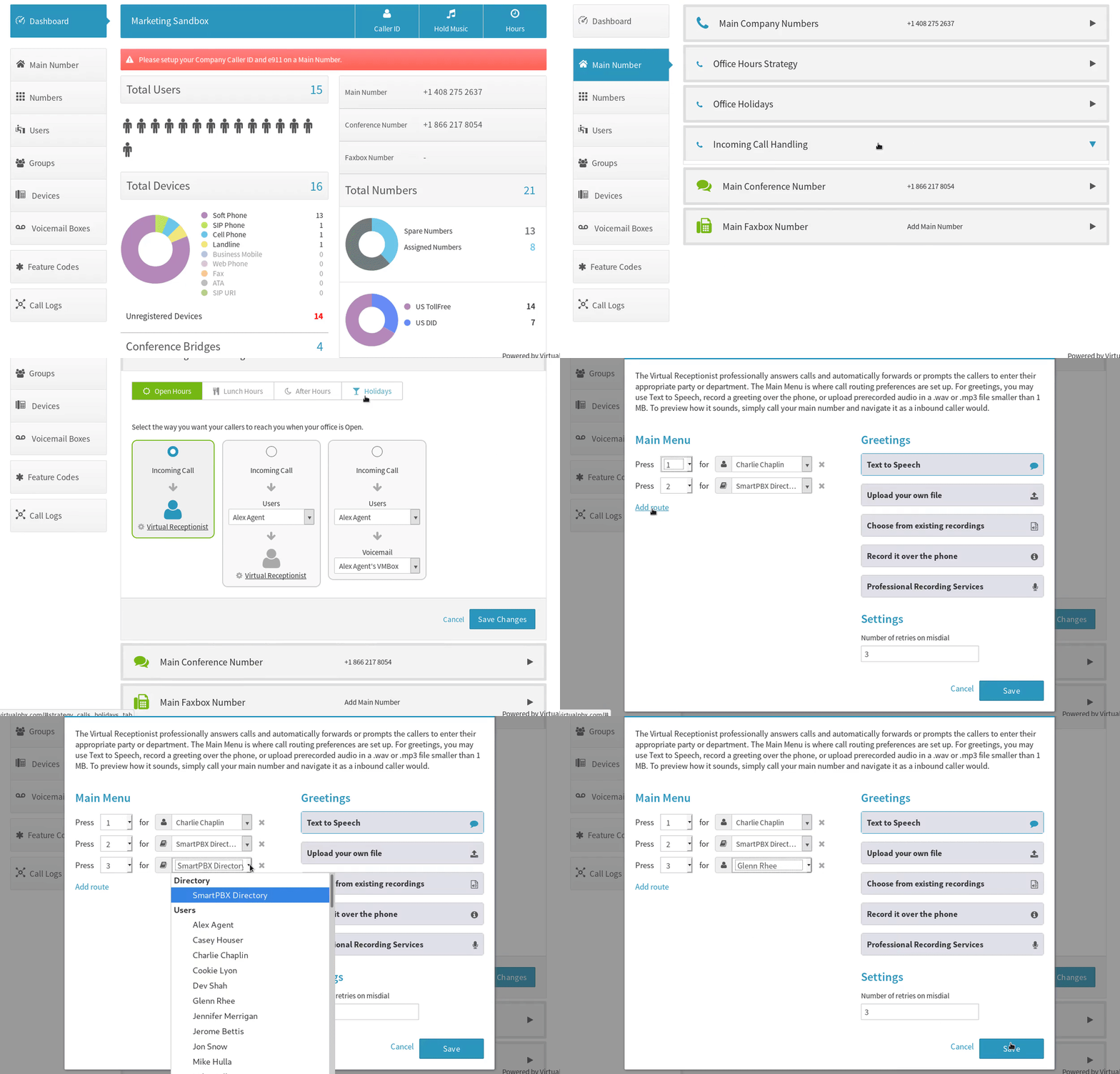
We aren’t going to deny that one of the most consistently popular features on any of our VirtualPBX cloud phone systems is the Auto Attendant. An Auto Attendant can route calls, forward to groups or individuals, be programmed to adapt to time changes and holiday schedules, and even field questions or direct to voicemail. With all of that ability packed into a free Auto Attendant, it’s easy to see why companies without the capital to hire new administrators find it to be such a helpful feature. That said, there is no need to use this feature to replace a live receptionist. When properly executed, an Auto Attendant can actually serve as an assistant and enhancement to the operations of any live receptionist. Here are a few of the ways a live receptionist can benefit from an Auto Attendant:
- Added Coverage Being able to field multiple lines of call traffic is one of the most important duties of a live receptionist, but it may also prematurely interrupt the conversation he or she is currently on. With an Auto Attendant, you can arrange to have those alternate calls be answered by the phone system if the main line is busy.
- Specific Design for Live Receptionists Fielding calls within an organization is much easier when live receptionists can use Advanced Transfers to ensure swift and accurate call transfers. Plus, for critical conversations that need to put on hold, calls can be parked and this and a host of other useful features can be accessed right from a handset with Feature Codes, too.
- Pinch Hitter Being able to call in a back-up to bat for a team member is a great advantage in baseball, and the same can be said for a live receptionist, too. Fielding phone calls is easier when you don’t have to be stationary at a desk, so if a cordless VoIP office phone isn’t available, knowing that an Auto Attendant will answer calls in your absence is a huge relief when you need a moment of, well, relief.
- Professional Representation As we’ve mentioned, the best live receptionist can do more than just act as an operator, he or she can also be the company’s best brand ambassador, too. Fortunately, a virtual receptionist can do the same thing. By being able to customize everything from on-hold music to automatic and professionally recorded messages that dynamically change for holidays or promotions, a live receptionist never has to worry that a virtual replacement isn’t pulling their weight.
- Infinitely Expandable The only real threshold that even the most capable and competent employee encounters is that of scalability. Because an Auto Attendant never needs to take a lunch break and can handle multiple concurrent calls without any attrition to the quality and polish of each one, there’s no need worry about overloading the system. Plus, because all of VoIP Phone Plan features are hosted in the cloud, they can be scaled up or down as needed to grow with a company with just a few clicks, too.
Auto Attendant is Just One Way to help a Live Receptionist
The above list barely scratches the surface of the examples on how an Auto Attendant can help any live receptionist be better and more agile at work. The ways a live receptionist can benefit from a VoIP plan are as many and as creative as the administrators thereon. Because companies can add dozens of recording options, add department groups at will, and have infinitely customizable voicemail, faxmail, and greeting options, this literally is just the tip of the iceberg. Plus, add into the fact that all of those presets can be dynamically programmed to act differently for night/day hours and holidays, too, and you’re left with a system that is almost as dynamic as your live receptionist. Of course, no program will replace him or her, but this one sure does come close.
To see first-hand how Auto Attendant works, you can sign up for a Free Demo right now, or just hit us up on Twitter and Facebook with your questions. Also, if you already have your Dash Plan and Auto Attendant and need a little help setting it up, we have online call handling support available and you can even call us right from those resources if you want, as well. If you do, don’t be surprised if you are wildly impressed with our combination of automated and live receptionist skills, either.

KP360 on VoIP and VoIP Phones: It’s Always Easy When You Know
Posted on May 29, 2018 by Dan Quick

You’ve got questions, KP’s got answers. Kevin Peyton is, on the surface, the Vice President of Sales at VirtualPBX, but digging a little deeper reveals so much more. An expert in everything from hosted telecom to competitive roller-skating (seriously) and everything between, Kevin fields whatever we throw at him, so we thought we’d let you have a shot. The gauntlet has been thrown, welcome to KP360!
One of my favorite sayings is, “It’s always easy when you know.” This is true for many things, a new smartphone, a new car, a new washing machine. They all have features and functions that we know nothing about when we first encounter them. This can be very frustrating until we have mastered the basics of these new items. Soon after becoming familiar with new technology, however, we find ourselves more reliant on it than we ever thought possible. The same can be said for a new phone system. Business telephone systems are no different, and in fact, can seemingly be even more daunting to become proficient with. The good news is that modern cloud phone systems are much easier to setup and manage than you may think. To help understanding how modern phone systems work, I’d like to break it down into three fundamental components.
Phone Numbers
Historically referred to as “lines” due to the need for an additional phone number for each concurrent call you may need (ie: rollover lines). Think of phone numbers like your email address in that it’s how you’re found and contacted over the telephone network. Also, just like when someone sends an email to the correct address, the call comes to you. In the VoIP world, the need for rollover lines is no longer what it once was. In fact, a single number can support dozens of concurrent phone calls whereas older technology had much lower traffic thresholds. Alternatively, adding individual numbers can replace navigating through an automated attendant by being designated as direct inward dial (DID) numbers where a caller may call directly to a person or department. There are many other uses too, like marketing campaigns or having a local presence where you may not have offices. This can be easily accomplished by adding phone numbers with whatever area code you need.
Features & Functions
This is the fun part and where all the magic happens. Many of these features used to require an expensive investment in a hardware PBX (private branch exchange), a PRI (primary rate interface), annual licensing fees, and IT staff to manage and maintain it. Other features on a modern VoIP plan may not have been available at all, even with all of that added hardware. The good news is that because hosted telephone systems all live in the cloud, they’re easily set-up and managed through a simple web browser. You never have to worry about capacity, or any confusing telephone people jargon, either. You can simply add the users that you need and can add or remove them at any time as your business needs evolve. A lot happens behind the scenes to make all of the features of a VoIP platform work, but the complexity of it all is hidden with an intuitive user interface that lets you simply point, click, or drag-and-drop to get the behavior you want from your phone system. In addition to ease of use, when you need more help our award-winning Training Team can walk you through it for free, too.
Phones & Devices
An IP or VoIP phone is the only thing installed at your location. There are many choices of phones and this can sometimes be the most confusing part of getting a new phone system. I try to break it down to a few fundamentals that will narrow down the choices. Will you use “Soft Phones” or “Desk Phones?” Both of these are VoIP Phones, one made of software and the other made of plastic. Second is budget, how much do you want to spend? The price range is dramatic with some phones starting as low as below $50 upwards to $1,500 for the most powerful and cutting-edge technology. Third is features like mobility in that would you need a simple desk phone or maybe a cordless phone? Color touch screens with lots of programmable features? Will it be used in a conference room for conference calls? Do you prefer more elegant phones for executives and if you have a receptionist answering all incoming calls, that person will need a useful phone to manage the call traffic. With phones, it’s important to keep in mind what is the most productive phone features for specific roles in your business. Whatever phone you happen to choose, however, the good news is that once you get them plugged into the internet and power and they just work.
VirtualPBX Answers: How Does an Internet Phone Call Work?
Posted on May 22, 2018 by Dan Quick
 Placing a phone call is pretty straightforward and something that most people probably don’t think twice about. With the advent of the digital age, placing an internet phone call is becoming more common and, although the end result is the exact same as with a traditional call, many people question the mechanics behind how this works. And because plenty of our readers have asked us on either Facebook or Twitter exactly what an internet phone call is and how it works, we’ve decided to address the topic in this latest edition of VirtualPBX Answers.
What is an Internet Phone Call?
In its most simplistic terms, an internet phone call can refer to any type of voice communications that don’t rely on traditional copper-wired telephone line infrastructure. This means that an internet phone call is a voice connection that relies on data connections over the world wide web to connect two parties. This is where it gets a bit nuanced, but there’s a difference between an internet phone call and other voice connections. Connections that link parties via actual phone numbers require a particular set of technologies, and this blog will focus on those. Conversations that occur between phone numbers will always need to interact with the PSTN (Public Switched Telephone Network) regardless of if they are antiquated wired phone calls or modern internet phone calls. Picturing the PSTN as a massive switchboard that directs traffic to all known telephone numbers may be a bit difficult to conceptualize, but it’s an accurate summation of what it does. Older analog telephone calls route through wires into PBX’s (Private Branch Exchange) that are like sub-stations for the PSTN and can be either on-site (for corporations, perhaps) or installed as intermediaries by a telephone company (in neighborhoods or apartment complexes, for example). The call is then routed from the PBX to wherever the destination is located via a series of wires and PBX locations along the way. An internet phone call does something identical in result with a fraction of the logistics.
How Does an Internet Phone Call Work?
An internet phone call relies on converting the audio of a phone call into packets of digital information that it will transmit over data connections. These packets travel into a virtual PBX, which is a digital facsimile of the aforementioned PBX, but it is entirely hosted in the cloud. The audio is then ushered to its destination form the hosted PBX to the PSTN and thereby the internet phone call is connected to the desired telephone number. The name for voice connections that use this method is Voice Over Internet Protocol, commonly referred to simply as VoIP.
What is the Advantage of an Internet Phone Call?
There are a variety of benefits for using VoIP and internet phone calls over traditional means, most of which are immediately apparent in a monthly telephone bill. The cost savings of VoIP over a traditional phone service can be staggering, too, when organizations with more complex needs like call routing, ACD queues, and call recording are present. However, even simple phone plans for individuals are routinely more affordable over VoIP, as well. Additionally, the fact that internet phone calls require no physical equipment or on-site engineering know-how to operate makes their flexibility, adaptability, customization options, and scalability the hands down winner over older, copper-wire telephone options. Not to mention the fact that with advanced WebRTC (Web-based real-time communications) options becoming more popular, there are even free web phones that operate perfectly from any modern web browser, too. To find out how much your business would benefit from a new VoIP service, simply compare your telephone bill with one of these Award-Winning VoIP Plans from VirtualPBX.
Why Remote Working Could Help Families Live Better Lives
Posted on May 17, 2018 by Dan Quick
 Trying to stretch a dollar to its maximum impact is nothing new. For as long as Americans have dealt with a shift from a production to a consumption-based economy, venturing to get more for less has been just a way of life. But in a recent study, it was determined that nearly half of American families can’t afford basic costs of living like rent, food, and child or health care. While many of these families were involved in service roles that require an in-person presence to perform the functions of the job, others are able to execute on the expectations of their jobs from almost anywhere. This is why remote working could help families live better lives if they are able to relocate to more affordable areas without the burdens of commuting or the high costs of living associated with more densely populated areas.
How Remote Working Could Help Families Live Better Lives
The crux of the issue about affordability struggles in the face of an unemployment rate below 4% is that wage increases have been notoriously lagging behind those of costs of goods and inflation. This has been infamously the trend since back in the 1970’s but, in light of these near-historic unemployment rates, takes a new place in the public conversation. The way that many American families have been choosing to deal with the issue is by participating in the gig-economy of picking up side jobs or simply going without vacations in an effort to keep their productivity at a high level. From a health and productivity standpoint, taking time off from work cannot be overstated in its importance, but alas, this is the choice many Americans make. It doesn’t have to be that way. By leveraging the advanced, cloud-based communications tools and techniques available to the nearly 40% of the workforce cited in this study that doesn’t rely on physical tasks to complete their jobs, there is a better solution. Remote working isn’t just a convenient way for business travelers to remain productive and connected while on the road, it’s also a viable option for many workers to beat the affordability curve and live truly better lives.
Find the Right Location and Go There
At the risk of oversimplifying what is obviously a complex and emotionally charged topic, the benefits of relocating to less expensive areas and conducting more work from there is an immediate way to make income go further. With the increased access to high-speed internet access across the country becoming more common in more places, there isn’t much else a modern worker would need to contribute right from the comfort of his or her own home. Plus, with cutting edge technology like the free VirtualPBX Web Phone increasing accessibility for cloud-based communications, the barriers to entry into a remote working lifestyle are virtually nonexistent. Plus, there are hosts of resources available for companies that are new to remote working policies on how to manage remote teams that will help smooth the transition into a more distributed workforce. So what are you waiting for? Hop on the web and start picking the hometown of your dreams and maybe you’ll find that your expenses won’t be as great of a percentage of your income before you know it. If you need any help on tips or tricks on how to proceed, feel free to ask us on Facebook or Twitter and we can help point you in the right direction, wherever that may be. And before long, you can see why remote working can help your family live a better life!
VirtualPBX Answers: What Are Online Phone Calls?
Posted on May 15, 2018 by Dan Quick
 The concept of what a telephone call is shouldn’t be abstract to anyone reading this. Basically, a point-to-point voice conversation is something that has been a part of our daily lives for generations. While not everyone knows the mechanics behind how a telephone call actually connects two people, the basic concept is widely understood. The advent of the digital age and the proliferation of access to high-speed data connections have introduced the possibility for online phone calls to grow in popularity. Online phone calls are very similar to traditional phone calls in that most people understand the concept of using the internet to connect two parties, though again the mechanics of how that occurs tend to be less commonly understood. In this blog both the methods of how to make online phone calls, as well as the technology behind them, will be made clear.
Understanding Online Phone Calls
Online phone calls are like regular telephone calls in that they each connect calls over the PSTN (Public Switched Telephone Network). This is basically the massive “switchboard” of sorts that all telephone calls need to go through in order to connect to each other. Traditional phone calls do this by routing through copper wires that are physically connected to the PSTN, and online phone calls use VoIP (Voice Over Internet Protocol) to do the same thing. To accomplish that, VoIP uses cloud-based facsimiles of the junctions that wired telephone calls go through, called a PBX (Private Branch Exchange). Because it’s logistically unrealistic to wire a single cable from one phone to all the other phones on earth, these junctions (PBXs) act as efficient aggregators for connecting the world. A hosted PBX, as used by a VoIP system, is a virtual equivalent of a standard PBX and as a result doesn’t require any of the physical equipment or costs associated with an on-site option.
Benefits of Online Phone Calls
Without comparing all of the relevant benefits and restrictions that exist between a hosted and an on-site PBX, the reality is that more businesses are choosing to make online phone calls over traditional ones every year. The main arguments for this seem to fall into one of two different categories; price and flexibility. By relying on digital technology to connect calls to the PSTN, companies can save upwards of 70%-80% over on-site analog options. Additionally, because most employees have a nearly constant access to high-speed data connections, leveraging a VoIP-powered business phone system makes more sense for people who are often outside of the office. This is especially true considering how some telecom options include 4G LTE nationwide mobile networks fully integrated into their business VoIP packages. Additionally, with mobile communications continuing to evolve and integrate further into existing web-based technology, there are even more flexibility and cost benefits to be had. Most notably, the open-source software WebRTC (Web-Based Real-Time Communications) have allowed for free web phones to become available for making online phone calls over any modern web browser.
Begin Making Online Phone Calls
Getting started with making online phone calls is easy with the no-strings-attached Free Trial. You can email our Sales Team today to get started. This 14-day option lets a business try the full complement of VirtualPBX hosted VoIP features on our Essentials or Advanced plans. And considering that the VirtualPBX Web Phone is totally free to use and only draws from the existing pool of minutes on an account, making online phone calls is about as simple as clicking through to a pick your plan now!
Tech Talks: Using WebRTC to Make Safer, Cheaper Web Phones
Posted on May 10, 2018 by Dan Quick
 We’ve been around for a long time and have collected some of the best minds from across several industries, and we think it’s high time they got their day in the spotlight. In this series of blogs we’ll be unearthing some of the technology and talent that power our hosted communications platform.
We’ve been spending a lot of time lately talking about our new and free to use VirtualPBX Web Phone. And why wouldn’t we? We’ve been getting blasted with positive feedback on the easy-to-use and powerful, browser-based VoIP phone. But what many people may not immediately realize is that, because it is a browser-based platform, the VirtualPBX Web Phone relies on relatively new and groundbreaking technology called WebRTC. WebRTC stands for Web Real Time Communications and to understand what makes it so revolutionary, we sat down with one of the chief architects of the VirtualPBX Web Phone and overall technology guru extraordinaire, Daniel Ruiz, the VirtualPBX Vice President of DevOps.
Okay, Daniel, for starters we’ve defined what the term WebRTC literally means, but can you add any other context to what it actually is and how it helped you make the VirtualPBX Web Phone?
Sure thing, WebRTC is a function of the latest developments of HTML5, which is basically the universal language for structuring and presenting content on the web. What WebRTC really does is that, because it’s built out of HTML5 it represents something that is universal for really any website from both a page and a browser standpoint. This is great because anything that’s built off of an open-source platform that is as widely recognized as HTML5 means that there are vastly fewer challenges than with other technologies. And then finally, the big thing about WebRTC is that because it’s inherently compatible with HTML5 web content, that means it can conduct browser-to-browser communications on a universal scale.
Okay there are two things to unpack there, one is about open-source and the other is about those more challenging technologies. Can we start by explaining what open-source is please?
No problem, open-source is the name used for software that has the original source code available for free to use and modify for anyone who wants it. That means that, for our VirtualPBX Web Phone for example, we got to use the open-source HTML5 software to build a WebRTC platform that supported all of the advanced features that any of our Dash Service Plan customers expect from their VoIP phones. Plus, then we were able to wrap it in an attractive exterior and present it with a simple, clean interface that is deserving of the award-winning UX/UI design of Dash itself. The big takeaway from launching Dash a few years ago was that customers loved how easy it was to intuitively navigate and how that didn’t come at the expense of any of the whiz-bang features of an enterprise-grade telephone system. We were highly motivated to ensure that was the same reaction that people had to any web phone we released and I’m proud that we accomplished that with the VirtualPBX Web Phone.
That’s very helpful, thanks. Now about the other options out there for building a web phone that weren’t quite as attractive, can you talk about those for a moment?
Honestly, that would be a really short conversation because there’s really nothing that can do what we’ve done with the VirtualPBX Web Phone that would also be as simple, and more importantly, as secure as this.
That’s a huge topic for our audience, what are the security concerns of non-WebRTC communications?
Previously, the only way to do something like an immediate browser-to-browser communications interface relied on any one of a few options, the most commonly known one being with a Flash plug-in. As you may have heard, Flash has been the bane of cyber security folks for ages. To sum it up, though, Flash and other plug-ins all suffer from the same few weaknesses that aren’t problems in WebRTC. First is that, unlike WebRTC, any plug-in requires a download. This is problematic because one, it can come with added malicious viruses or malware, and two, specifically for a business environment, not all users have admin permissions and therefore can’t allow downloads and installs onto their computers. Also, unlike WebRTC that is constantly monitored and updated in the cloud, any type of plug-in requires multiple patches and updates to be managed by the end-user. And as I know you’ve mentioned in previous blogs about cyber security, the common way endpoints are compromised is by not being diligent with updates and patches and whatnot. And not to beat a dead horse or anything, but again, none of that is a concern for the VirtualPBX Web Phone.
Ha, by all means, beat away! Okay so what else should we know about the web phone and is there anything else coming down the line for it?
Well as you know, we have a lot of great things on the horizon that all can be seen right now on the VirtualPBX Product Roadmap, but there are always even a few more surprises that don’t quite make it to the list until they’re launched. That’s because we like to keep some surprises truly surprising, of course. But that said, rest assured that the web phone is no different than any of our proprietary technology in that we’re never really satisfied with good enough and will continue to develop it to its greatest potential ad infinitum.
Wow, strong words from a strong DevOps leader.
You know it, buddy.
Regardless of what Daniel and the rest of the engineering talent at VirtualPBX is working on, you can rest assured that it will be designed to deliver the best features in hosted voice communications available. Additionally, all of the features of the VirtualPBX Web Phone are backed by the 24/7 support of our award-winning Customer Support Team so you never need to worry about going it alone. Plus, because we’re one of the only companies to include our Support Team at no extra charge, you can use their expertise any time you want, as much as you want. To get started with your new VirtualPBX Web Phone or Dash Plan simply click through and you can be up and running in literally a few minutes from right now. Otherwise, you can always join the Tech Talks conversation by suggesting topics on Twitter and Facebook, too!