




VirtualPBX Customers: Reply faster and earn more business. Unlock your member-only savings on AI-powered Webchat →

PRODUCT FEATURE

Web Phone

The VirtualPBX Web Phone allows you to make business calls right from your browser, making remote business calling simple and seamless.

If any member of your team has a device with a web browser, they have a business phone. It's that simple.

A web phone is a browser-based business phone system that allows users to make and manage calls directly from their web browser without hardware or downloads. It functions like a traditional desk phone but is accessible from anywhere. The VirtualPBX Web Phone includes calling, voicemail, call recordings, and full call management tools in one interface.

Built For How Real Work Happens

We’ve designed the VirtualPBX Web Phone based on real user feedback about where traditional tools slow teams down. The result is a cleaner, more functional browser experience designed for everyday use.

Voicemail Transcripts Built In

Read voicemails instantly with automated transcripts, or listen and manage messages without switching tools.

VirtualPBX browser-based web phone offers voicemail recording and transcripts instantly, without ever leaving the interface.

Floating Dialer For Active Calls

Keep your call controls accessible while you move through other tasks in your desktop browser.

Unified Call History & Contacts

Access recent calls, favorites, and team directories without leaving the interface.

The VirtualPBX Web Phone offers browser-based phone calling from any device with the internet.

Call Recordings at Your Fingertips

Review, replay, and manage recordings directly inside the web phone without navigating to a separate dashboard.

The VirtualPBX Web Phone has call recording and history right inside the interface. Access all your call information from any device with a browser.

Simplified Call Management

Mute, hold, transfer, and dial with fewer clicks and less friction during active calls.

Just like your desk phone, VirtualPBX web phone has all the same features and functionality. Sacrifice nothing as you work remotely from anywhere.
Make and receive business calls directly from your browser with a web phone—no downloads or additional hardware required.

Connection Without Complexity

The VirtualPBX Web Phone runs entirely in your browser using WebRTC technology. Just log in, assign users, and start calling.

FAQ: Web Phone / Browser Phone

Feeling overwhelmed? Not a problem. Here are answers to some of the more popular and isolated questions we get around the idea of a web phone.

A web phone is a business phone that runs directly in your browser, so you can make and manage calls without a physical desk phone or installing any software.

You may see other terms out there—browser phone being one of them. A browser phone is just another name for a web phone. It allows you to make business calls from your web browser using VoIP and WebRTC technology. They are one in the same.

Absolutely. A web phone lets you make and receive business calls directly from your browser without needing a desk phone or additional hardware.

When someone references remote calling, they’re generally referring to making and managing business phone calls from any location using internet-based tools like a web phone instead of traditional desk phones.

This is one we want to be very clear about. No. The VirtualPBX Web Phone runs directly in modern browsers with no downloads, plugins, or hardware required.

Yes. You’re not sacrificing functionality if you choose to go with a web phone. The VirtualPBX Web Phone includes all the basic desk phone functionality like calling, voicemail, call transfers, and call history—it’s just delivered through your browser.

Many people ask if they can mix and match a combination of desk phones, softphones, mobile devices, desk phones, and more. And the answer is, absolutely yes. You can mix devices within teams, by teams, or simply by individual preferences. All devices will lead back to your VirtualPBX business phone system.

Yes! You can make calls and have full functionality from your mobile phone or tablet. As long as you have the browser window up and active, your web phone will work. Unlike a softphone, if you close your broswer window or move your browser application to the background, calls will not ring through. You will however, be able to bring the window back to the foreground and see a missed call, voicemail, etc. as long as you are logged in.

Yes. You do need a VirtualPBX business phone plan. However, every plan includes the Web Phone and the VirtualPBX Softphone. No matter where you start, they’re included. Because options are everything!

Accessing the VirtualPBX Web Phone is easy. You can log in right from your browser at https://webphone.virtualpbx.net/

Did we miss something? There are no stupid questions. Call or text us at (888) 825-0800 or jump on a web chat. We’ll be happy to walk through anything at any level of detail.

Web phones work great when you’re at your desk and active. Softphones keep you reachable everywhere else.

Get Started With the Web Phone

The VirtualPBX Web Phone is built into every business phone plan.

Choose what works for your team and start making business calls from your browser today.

Flex
$18user/month
Polished appearance, smart routing, and caller ID for your small business.

This business phone plan includes:

Pro
$29user/month
Empower sales & service teams with integrations and advanced routing.

Everything on Flex, plus:

Growth
$49+user/month
Customizable plans for outbound teams, call centers, and client services.

Let us build it for you:

Required taxes & fees added at checkout. All plans include a 14-day money-back guarantee.

Flex
$17user/month
Polished appearance, smart routing, and caller ID for your small business.

This Business Phone plan includes:

Pro
$25user/month
Empower sales & service teams with CRM integrations and call recording.

Everything on Flex, plus:

Growth
$45+user/month
Customizable plans for outbound teams, call centers, and client services.

Let us build it for you:

Required taxes & fees added at checkout. All plans include a 14-day money-back guarantee.

More Features Worth Reviewing

Device Manager

Add, remove, and control devices without IT With VirtualPBX Device Manager, connecting your favorite tools

Follow Me

Choose your device order and never miss a call Follow me calling is one of

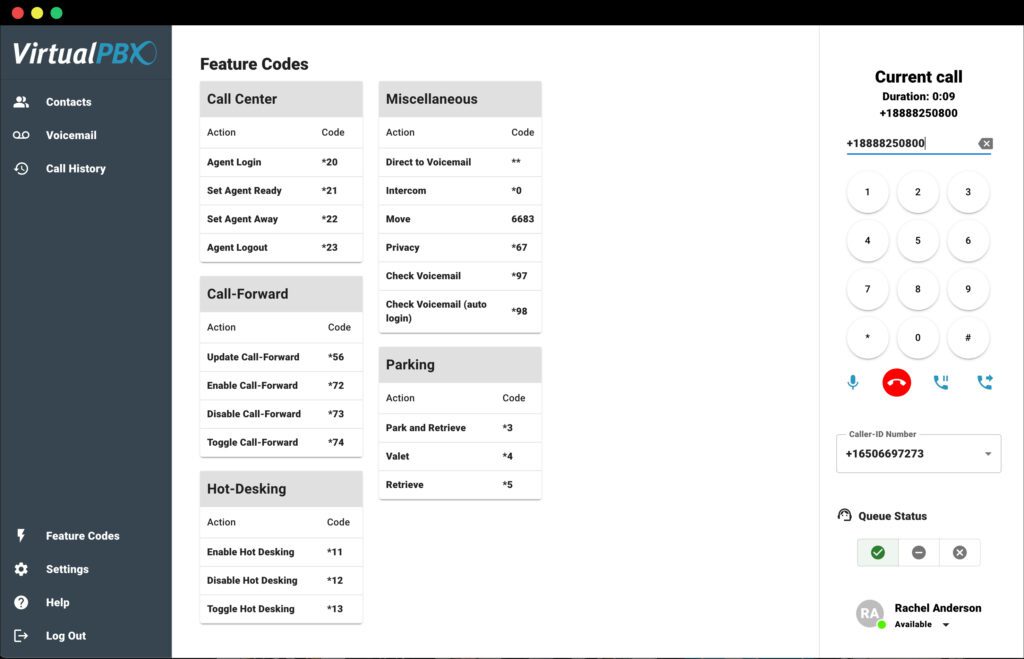
Feature Codes

Control your phone system with simple shortcuts. Feature codes are shortcuts that let you manage

core chat platform

AI + Automation

privacy + Security

Setup + Support

core chat platform

AI + Automation

privacy + Security

Setup + Support

core chat platform

AI + Automation

privacy + Security

Setup + Support

Web Chat Built for Results

Start Your 14-Day Free Trial

Capture more leads, respond 24/7 with AI agents, and manage every message in one shared inbox. After your trial, you will be converted to our $99/mo VirtualText Chat Plan.

Let's Build A Setup That Makes Sense For Your Business

Schedule a time to tell us how your team works. No fluff, just a quick chat with someone who knows this tech inside and out and knows how to make it work for you.

Test Us

Ask us anything.

We’ll answer, brainstorm, or just give you a number you can run with. If we don’t know the answer, we’ll find it. Zero pressure. No judgement. Just help.

Your Solution Starts Here

Plans & pricing

Prefer to explore on your own? Buy now.

Talk to Us Now

No robots. No waiting. Real people ready to help.

Get Demo

Let us show you around and discuss your needs.