During a recent conversation, Linh England and Abi Moore talked about how quickly call routing can become a challenge for small businesses.
As teams grow, calls need to go to the right place at the right time without creating more work. The good news is that powerful call routing doesn’t have to be complicated. With the right setup, small teams can route calls as intelligently, automatically, and professionally as their corporate counterparts, and typically within an SMB budget as well.
What Does Call Routing for an SMB Look Like?
At its core, call routing is the logic behind what happens after someone dials your business number.
That logic might answer questions like:
- Who should answer this call?
- What if they're unavailable?
- What if it's after business hours?
- What if the caller needs a specific department?
Modern call routing systems allow businesses to define these answers once and let the system handle the rest.
For small businesses, this means fewer interruptions, fewer transfers, and fewer dropped calls. In essence, added efficiency through a relatively low-touch system.
Auto Attendant: The Gateway Drug For Call Routing
The first step to call routing is often an auto attendant.
It’s an automated greeting that answers calls and presents options to the caller using keypad selections.
- Calls are answered immediately.
- Callers choose where they want to go.
- No live receptionist is required.
Example: “Thanks for calling Rogers Supply. Please press 1 for sales, 2 for support, or stay on the line for assistance in directing your call. If you know your party’s extension, you may enter it at any time.
Auto attendants create structure, but the real power comes from what happens after the caller makes a choice.
Beyond the Menu: Programmable IVR
Programmable IVR (Interactive Voice Response) is the umbrella that brings advanced call routing options together.
Instead of a single, static phone tree, programmable IVR allows businesses to combine routing methods, apply logic, and adapt call flows to real-world scenarios.
This is where small businesses gain access to routing flexibility typically associated with large corporations without needing enterprise infrastructure.
Select Route: Interacting With The Phone Keypad
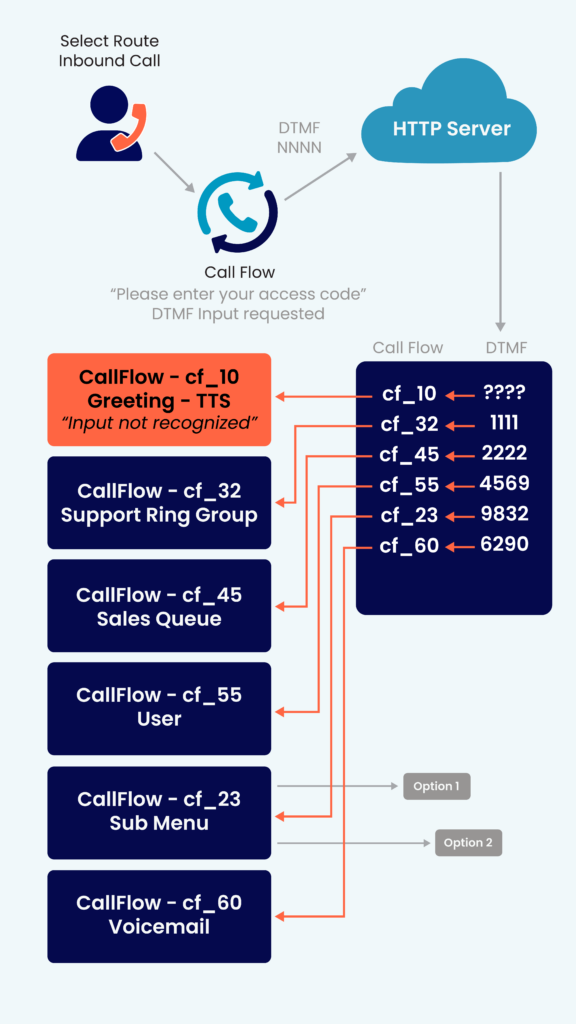
Select route asks callers for a specific DTMF (Dual-Tone Multi-Frequency) input—basically anything numeric that can be entered from the phone keypad. That could be a department number, a ZIP code, or an account-related detail, like the last 4 digits of a social security number. Based on the input, the system determines the destination based on a set of rules that customer has already laid out. It’s one input for one output.
Instead of flowing callers through a generic menu, select route lets the system make decisions based on concrete data, creating a smoother experience for everyone involved.
- Collects useful conversation context in advance, avoiding caller repetition and giving the agent time to retrieve the customer info.
- Reduces misrouted calls and unnecessary transfers.
- Helps small teams handle complex call flows without adding staff.
- Scales easily as locations, services, or teams change.
Example: “Thanks for calling James Gore Financial. Please enter your ZIP code. (Calls are routed to the nearest office or regional support team.)
After entering information, callers can be routed to a different auto attendant with new options, without ever needing to start over.
Auto Route: Automatic Routing From Call Data
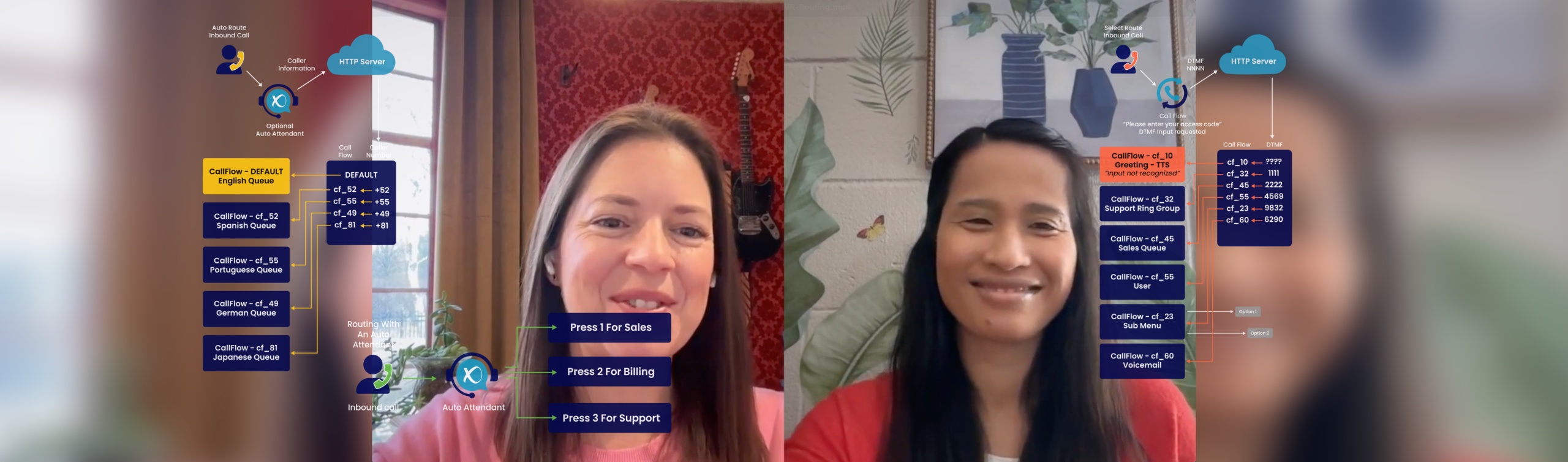
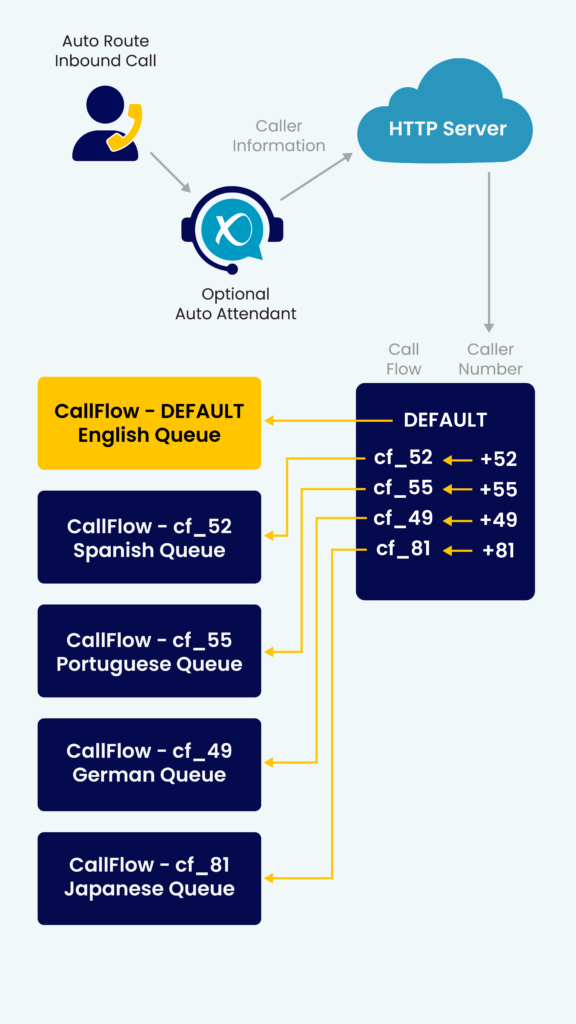
Auto route does not involve the caller at all. Rather, it uses the data already present from the incoming call to begin the routing process before the caller or recipient get involved. This is information like the caller ID, telephone number, or country code of the incoming call.
- Can route directly to a native language speaker.
- Sidesteps any caller input errors or misunderstandings.
- Speeds call response time and resolution automatically.
Example: A call comes in from Mexico City area code 55. That caller is automatically routed to the Mexico City location and the recipient initiates the call in Spanish. The caller does not say or do anything for this to happen.
Auto route can be a great tool for companies that removes a visible step from the entire process, resulting in a customer experience that feels more straightforward, as the work happens automatically, and entirely behind the scenes.
Day Routing: Calls That Change Based on the Day
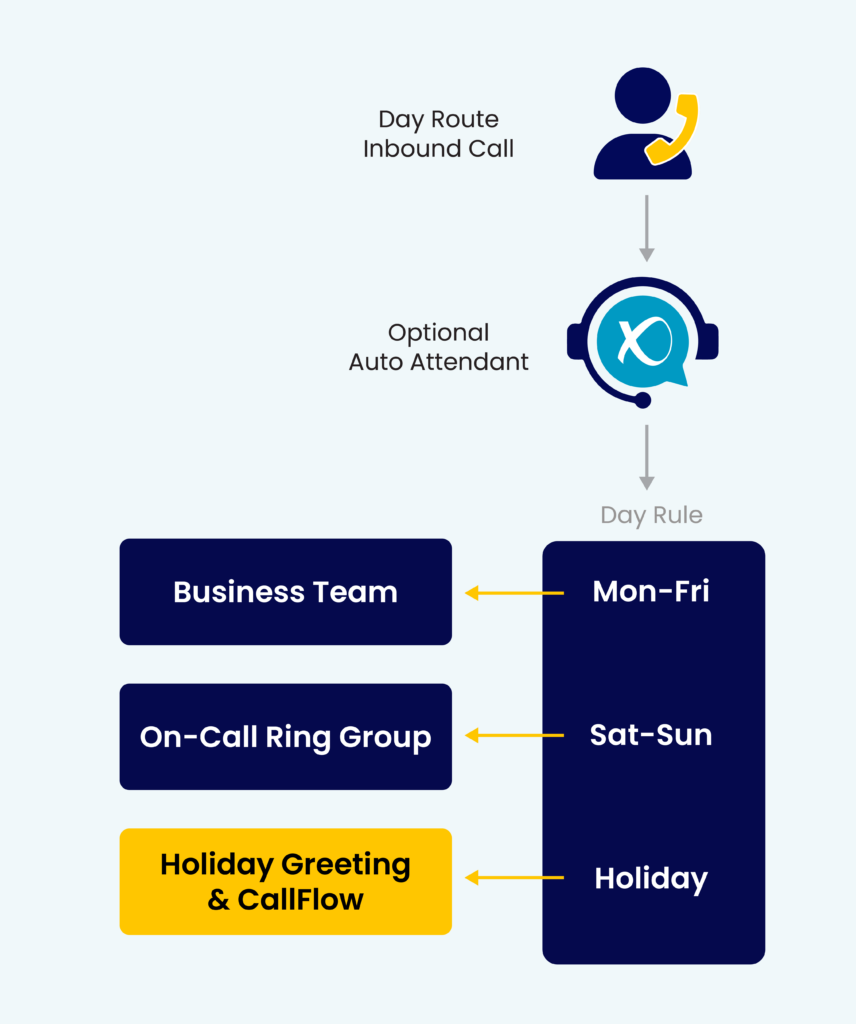
Day routing allows calls to be handled differently depending on the day, like weekdays, weekends, or holidays.
Not every day looks the same for a business. Staffing levels, availability, and priorities often shift depending on the day of the week or the calendar. Day routing ensures calls follow those realities automatically.
- Customize a weekday and weekend schedule.
- Adjust routing for holidays or team events.
Example:
Weekday calls: ring the team.
Weekend calls: Send callers to a smaller on-call group.
Holidays: Play a custom message or route to voicemail.
Day routing helps small businesses stay responsive without asking teams to manually update call settings every time the schedule changes.
Time Routing: Calls That Follow Your Business Hours
Time routing changes how calls are handled based on the time of day.
Customers don’t always call during business hours, but your team also can’t be available 24/7. Time routing creates clear boundaries while still providing a good caller experience.
- Route calls based on typical busy periods or high call volumes.
- Route calls based on specific team member hours.
- Customize routing to timezones for locations or remote work.
Example:
During business hours: ring the team or enter a call queue.
After business hours: Calls route to your emergency line.
Early morning or evening calls follow a different flow than midday calls.
Day routing helps small businesses stay responsive without asking teams to manually update call settings every time the schedule changes.
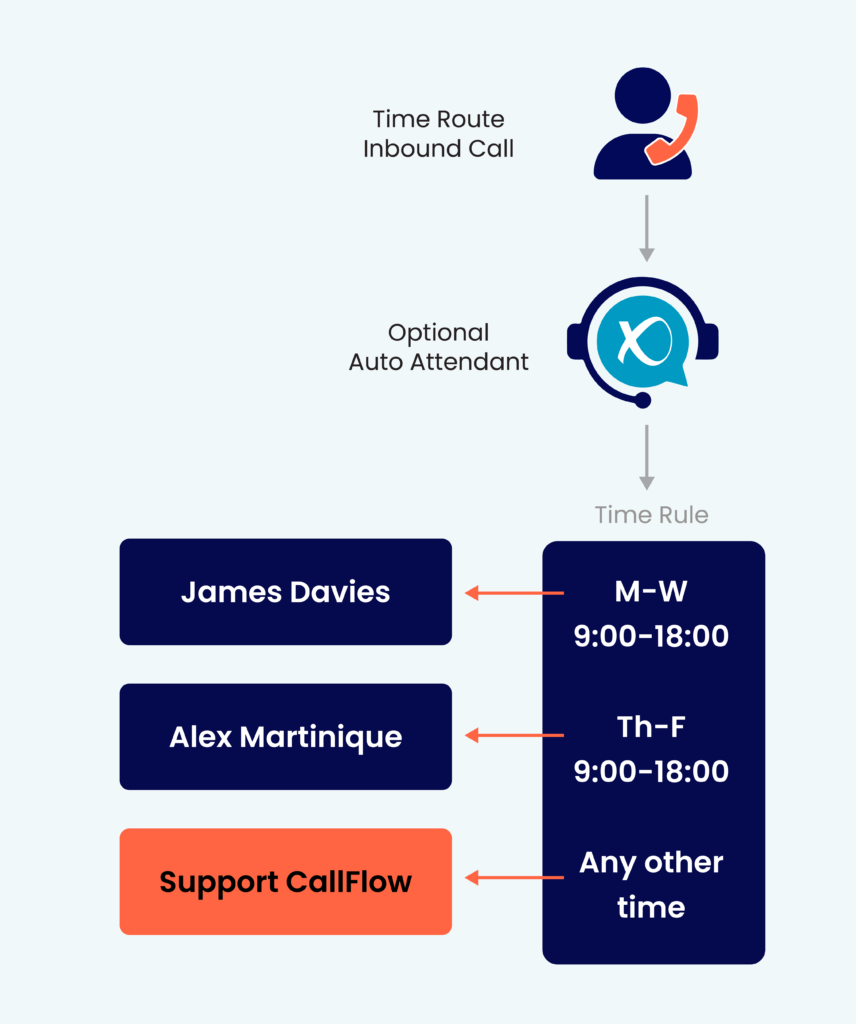
Together, day and time routing make it possible to design call flows that adapt automatically—no manual changes required.
Do I have to Choose and Set Up Call Routing Myself?
Short answer? No. Not only can our onboarding and support teams at VirtualPBX advise and design your call routing configuration, we’ll also set it all up for you—building it exactly as you envision, and even tweaking it until it’s smooth. Calls reach the right place, every time, and the system just works.
Advanced Call Routing Isn't Just For Enterprises
Advanced call routing has traditionally been associated with big call centers and enterprise systems. But modern platforms make these tools accessible to small businesses without the cost or complexity.
For small teams, this levels the playing field. You can sound professional, stay responsive, and scale your communications without adding headcount.
That’s because small business call routing isn’t about complexity. It’s about possibility.
Leveraging Advanced Call Routing For Remote Businesses
Remote and distributed teams don’t have the luxury of a single front des or a shared office where calls can be passed around. Advanced call routing fills that gap.
Select Route helps remote businesses collect context upfront, so calls reach the right person or team no matter where they’re located. Callers provide the details once, and the system handles the rest. If the recipient is in California or Canada, it does not matter. The call routes, answers, and sounds the same.
Auto Route ensures calls are delivered efficiently across time zones and locations by automatically sending them to the best available person without relying on a physical office or manual transfers.
Day and Time Routing keeps remote teams balanced and protected. Calls can follow business hours, shift schedules, or regional availability, ensuring customers always reach someone appropriate while teams avoid burnout.
Together, these routing options allow remote businesses to operate as a single, coordinated organization, even when teams are spread across cities, states, or countries.
Technical Appendix:
Call Routing Details for Advanced Users
For readers who want to understand the mechanics behind modern call routing, here’s a breakdown.
Programmable IVR relies on rule-based logic. These rules determine where calls go based on conditions such as:
- Caller input (DTMF selections)
- Time and date
- Agent availability
- Caller ID or known numbers
Routes can be stacked or layered. For example:
- Primary route: ring a specific team
- Secondary route: overflow to another group
- Fallback route: voicemail or external number
Advanced routing supports failover paths so calls are never dropped:
- If no one answers, calls automatically move to the next destination.
- After-hours rules override daytime behavior.
Technical users can build and modify routing flows directly. Non-technical users can rely on managed setup while still benefiting from the same underlying architecture.
Both approaches use the same enterprise-grade routing capabilities, just with different levels of involvement.
The real strength of programmable IVR is that these routing methods don’t exist in isolation. For small businesses, this means one system that adapts as the business grows, without needing to rebuild everything from scratch.
Whether you want a simple auto attendant or a fully programmable IVR with advanced routing logic, the right system adapts to your business instead of forcing your business to adapt to it.
And really, you don’t even need to know how the routing works—just that it works.
For questions about your call routing options, or just to brainstorm a plan, give us a call. You don’t have to be our customer. We’re just happy to help get you on the right path.