

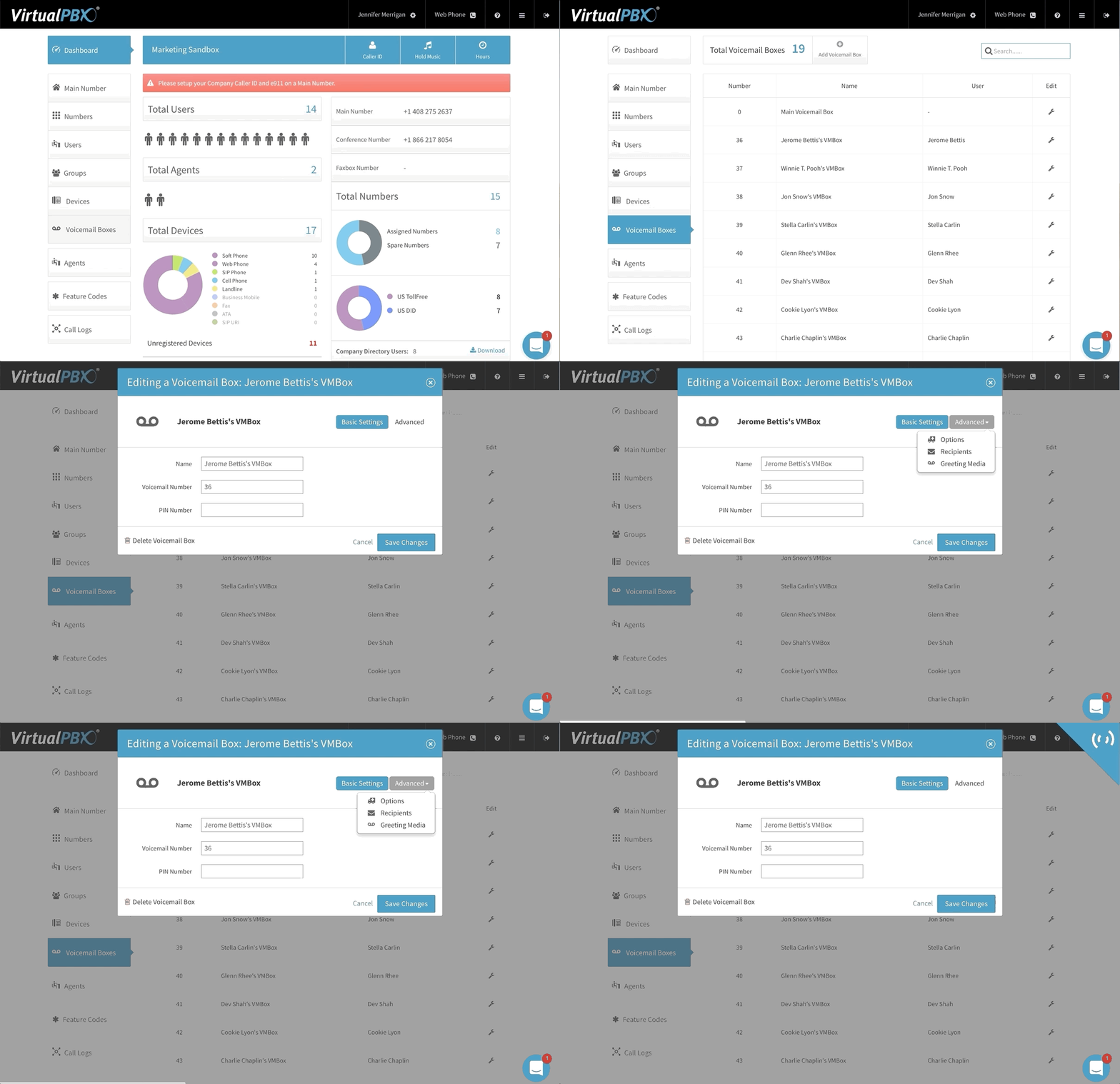

Your business voicemail service may come with the capability to forward new messages to your email address.
This isn’t just convenient. It can help streamline your daily tasks by consolidating the functions of programs you use most often. There’s often no way around checking your work email several times a day. When your voicemails populate your email inbox, it can save you time and alert you to action items like responding to high-priority customers. Forwarding options like this can send you a copy of the recording, not just a link to a web portal. This won’t substitute for a visit to the portal to clear out old messages, but it can provide you with useful information like the date, time, caller identification, and of course the content of messages.This document has discussed the reality that voicemail is often tied to a broader phone system.
A VoIP voicemail service is one of the prominent, expected features businesses will find when they compare phone systems. Their comparisons will also lead them to a number of ways in which voicemail is tied to other mainstay phone system features.
Part of the power of a hosted phone system is that you can route calls based on the time of day.
During business hours, you may want calls to ring a central office phone or make their way through an automated attendant.
After hours, though, it could be easier to send callers directly to a central voicemail box. This can work well for a small business that won’t need to field a lot of late-night calls.
Businesses can set their operating hours – say 8 a.m. to 7 p.m. – and create that cutoff for when voicemail takes over. Incoming calls can then gain their own path to voicemail for when employees are expected to be finished working.
Voicemail can also play an important role when employees are considered part of a logical group, like a department.
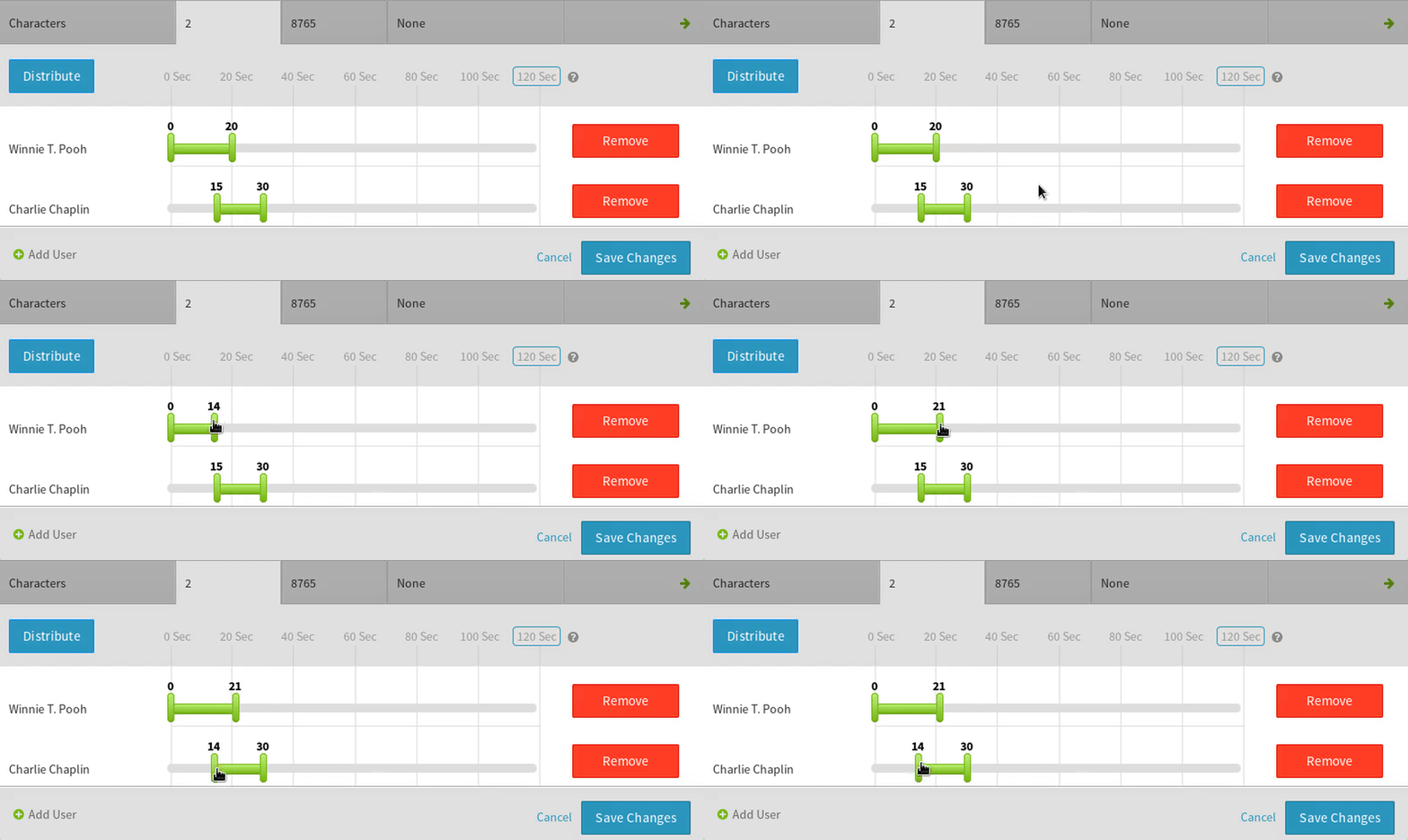
A Ring Groups or Hunt Groups feature lets calls ring multiple people inside a group. The GIF shown here demonstrates how calls can ring one user before ringing a different user in the same group.
Calls to this group would reach Winnie T. Pooh’s phone first before switching to Charlie Chaplin’s phone. When the slider bars overlap in the GIF, this is where the same call would ring both users simultaneously.
When the series of calls ends, it can terminate at a voicemail box of your choosing. Because Winnie T. Pooh would be the department lead in this situation, the caller would ultimately reach his voicemail if neither individual in the group answered their phones.
In this way, voicemail becomes an important part of the grouping process. It can help organize incoming messages by the priority you set as a system administrator.
A quick web search reveals a number of business options for transcribing voicemail message audio into a text format. Many service providers offer such transcription capability as part of the overall phone service plans they sell, allowing their business customers to have company-wide access to text-based voicemail without being forced to seek a third party for that functionality.
The availability of APIs for speech-to-text functions, including Google AI, have allowed phone service providers to easily integrate voicemail transcription at a low cost and without much overhead. Transcriptions can be completed on the fly, so customers can expect access to their transcripts immediately following the receipt of an inbound call.
Text output from the audio can be placed within voicemail notification emails to customers, as part of a web-based user interface, or even used as part of an API so customers can automate receipt of transcripts as part of custom applications.
Phone system attachment to third-party services allows for transfer of data from one web-based location to another. Voicemail-to-text transcripts are one example of the type of data that businesses can capture and process at will. The audio of voicemail messages, saved as files, are also easily movable.
Many businesses host their files in cloud servers — such as through Amazon S3. The collection of all manner of data in a centralized location can make it easier for businesses to access and back up their important data. Voicemail information can also be an asset worth saving, so some phone service providers create integrations with cloud storage companies to make it easier to save data outside the phone provider’s servers.
Integrations like this can make the process of file transfer the default option for data storage. Data can be saved automatically to an Amazon cloud (or similar) without ever touching the phone service provider’s storage. For many companies in the healthcare or financial industries, the use of third-party clouds may work as both a convenient option and a method of generating better overall data security for the businesses and their customers.
The voicemail features and business voice system integrations listed above this section pertain largely to hosted setups – otherwise called cloud-based or voice-over-IP (VoIP) phone services.
Vendors like VirtualPBX sell hosted systems to offer businesses a simple method of creating voice networks. Businesses purchase subscriptions from a vendor and connect their IP phones to that vendor’s voice network.
This process is often easy and quick. It allows organizations to upgrade their existing phone networks or begin new networks without extraneous effort. It’s usually affordable and complete with many features, including an attached business voicemail service.
Local, on-premise servers can also provide businesses with voice service. They can create greater security but come with a higher cost of ownership and more complexity in setup than their hosted counterparts.
 Benefits of a Cloud-Based Phone System
As just discussed, the primary benefit businesses see with a hosted phone service is its ease of use.
Business can get their entire operation networked and making calls within minutes. Even large corporations can experience complete setup times (including phone provisioning, voicemail configuration, and ring group creation) in less than a day.
IP phones connect to the internet, so they’re able to automatically reach the VoIP provider’s server, download any necessary updates, and begin accepting calls.
There’s no need to complete any extra wiring in a building once internet connections are in place. Additionally, mobile apps and web browser-based phones can just as easily connect to the VoIP network as their desk phone and conference phone counterparts.
Businesses, however, may prefer the security of a local system. They have the option of purchasing a private branch exchange (PBX) server to handle all their calls from local hardware.
Using an on-site PBX means you own the hardware of your phone system. You can modify the system to you exacting specifications, including changing phone numbers and adding extensions as necessary. You will also be in charge of ensuring the security of your data stores such as phone number listings and voicemail recordings.
A local PBX can work well for larger businesses with a dedicated staff of IT professionals. Since modifying the system and maintaining a high level of security can be complex, novices might not fare well with this avenue.
Voicemail service for a business can make its way into a hosted or local system.
The features discussed in this article will come prepackaged with many VoIP setups a single user, midsize firm, or enterprise can purchase and begin using within minutes.
The connection of voicemail to custom greetings, ring groups, advanced call routing, etc. can also work within a local system. The biggest difference is that the setup and maintenance of complex voicemail procedures in a PBX will far outreach a hosted setup.
Either way, a business voicemail system plays a large role alongside the daily operations of many companies. It helps employees maintain a structure to their inbound calls, and it filters messages into a reviewable stack. Moreover, voicemail can make a company look professional through the use of greetings that establish a basic relationship between caller and business.