
A smarter evolution of the traditional Auto Attendant
Route incoming calls automatically based on caller input, location, day, or time. VirtualPBX Programmable IVR gives your business more control over how calls reach the right people, without complex menus or manual transfers. And it’s still simple for callers. It’s just a lot smarter behind the scenes.
Already using an auto attendant? Programmable IVR takes traditional call routing further, giving you more ways to direct incoming calls as your business, your callers, and your schedule change.
How Does Programmable IVR Work?
Programmable IVR is the umbrella framework that applies intelligent call routing logic to every incoming call—routing automatically, guiding callers by input, or adjusting the call path based on time and schedule. It builds on the familiarity of an auto attendant, then adds flexibility so your call flows adapt to your business.
Within Programmable IVR are four individual routing functions: select route, auto route, day route, and time route. Each function serves a specific purpose, and they can be used on their own or layered together to create call flows that adapt to your business needs without adding complexity. For more ways to direct and distribute calls, visit our call routing page.
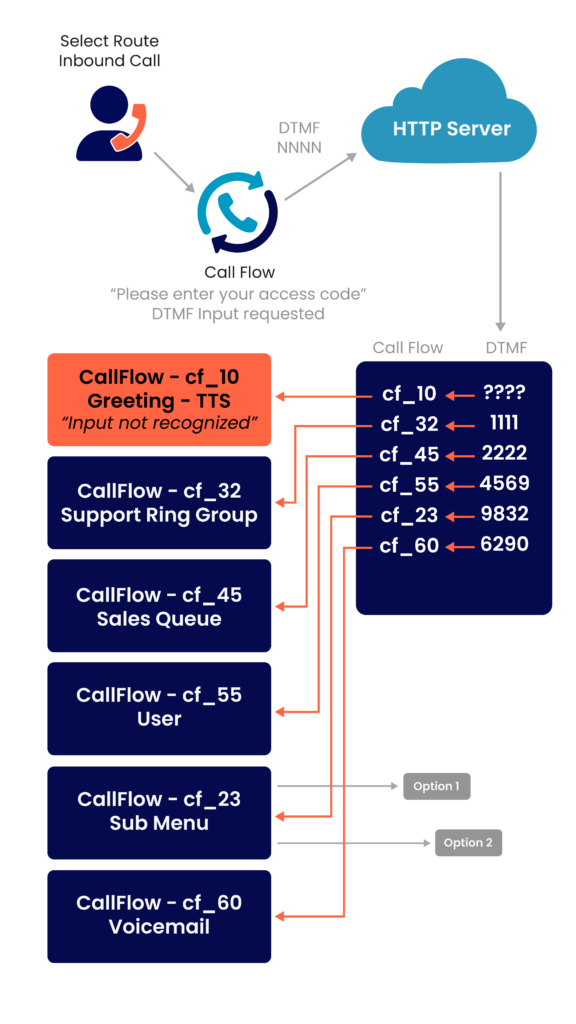
Select Route
Select Route is the most familiar programmable IVR feature. It allows callers to choose where their call should go using DTMF (Dual-Tone Multi-Frequency) keypad input—or the numbers on your phone key pad. This type of IVR call routing is similar to a traditional auto attendant, but with more control over what happens next.
Select route works best when call reasons are clear and predictable, like ZIP codes, PIN numbers, the last 4 digits of a Social Security number, or a department code.
- Callers choose a path using the phone keypad
- Improves incoming call routing accuracy
- Reduces transfers for common requests like sales or support
Auto Route
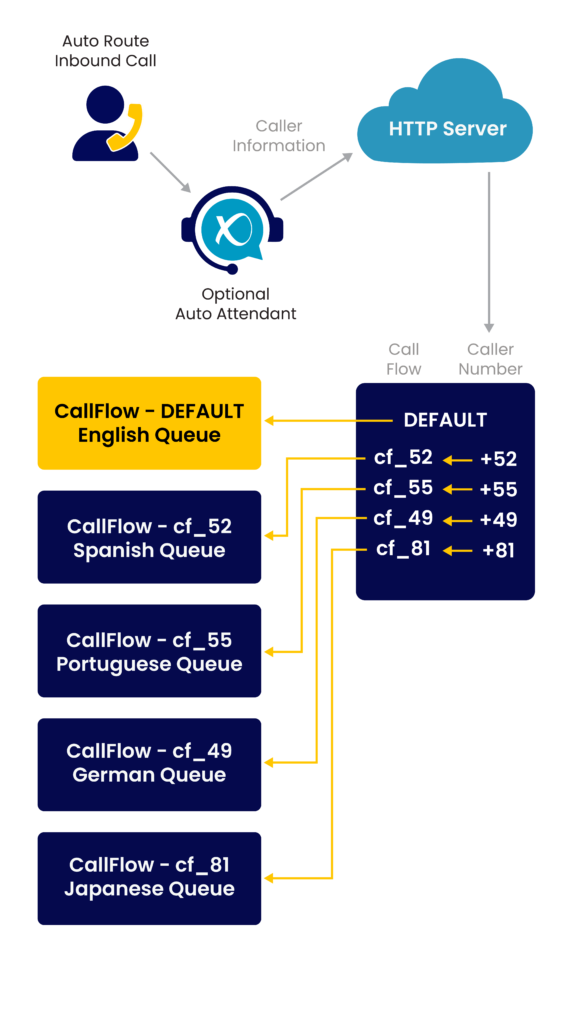
Auto route does not use any caller input. Instead, it uses data that’s already available when the call comes in—country codes, area codes, state or regional grouping, etc.—to determine where the call should go. The caller lands at the first spot automatically, before they actually engage with anyone.
Auto route works best when routing is location specific. Route international callers to a specific team, region, or language group. Or group multiple area codes together and route them to the same regional destination.
- Routes before the call is answered with no caller input
- Uses predetermined rules to route calls automatically
- Ideal for location-based routing
Day Route
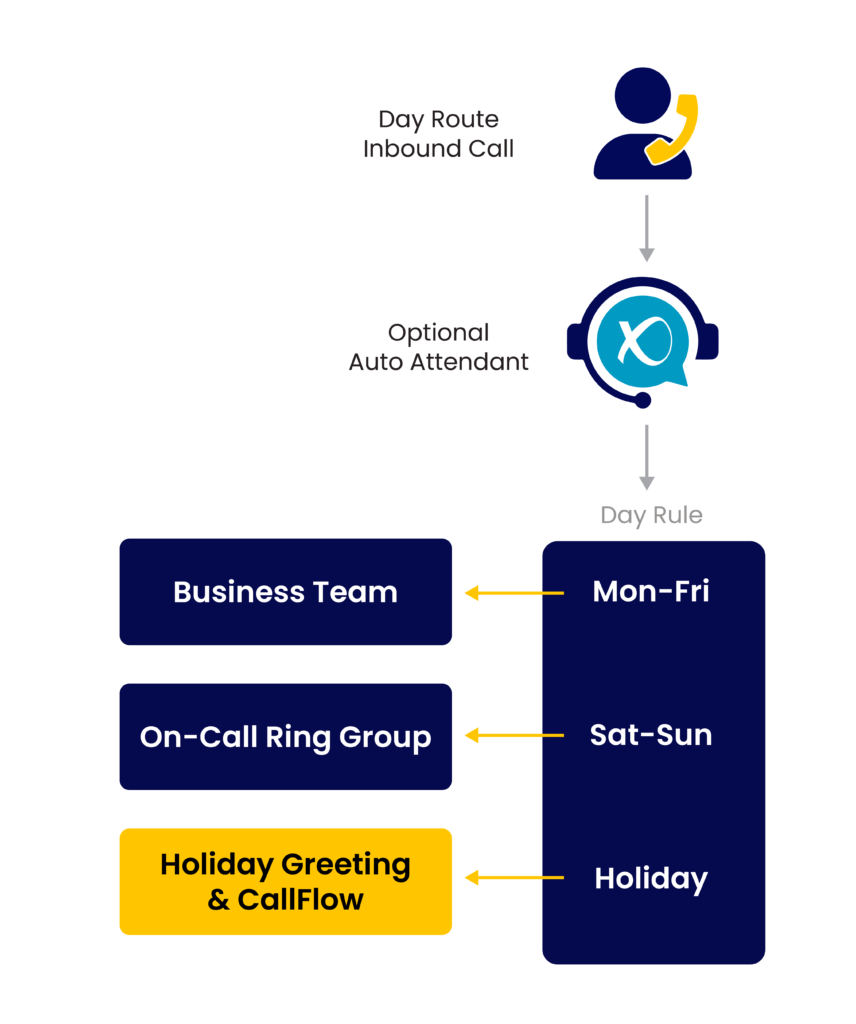
Day routing adjusts how incoming calls are handled based on either the day of the week or specific calendar dates. This means calls can automatically be routed differently on weekends, holidays, or special schedules.
For businesses with varying availability, day route ensures calls are handled appropriately and consistently, even when teams aren’t available.
- Routes automatically updated by day or date
- Prevents calls from reaching unavailable teams
- Supports consistent caller experiences year-round
Time Route or Time-of-Day Routing
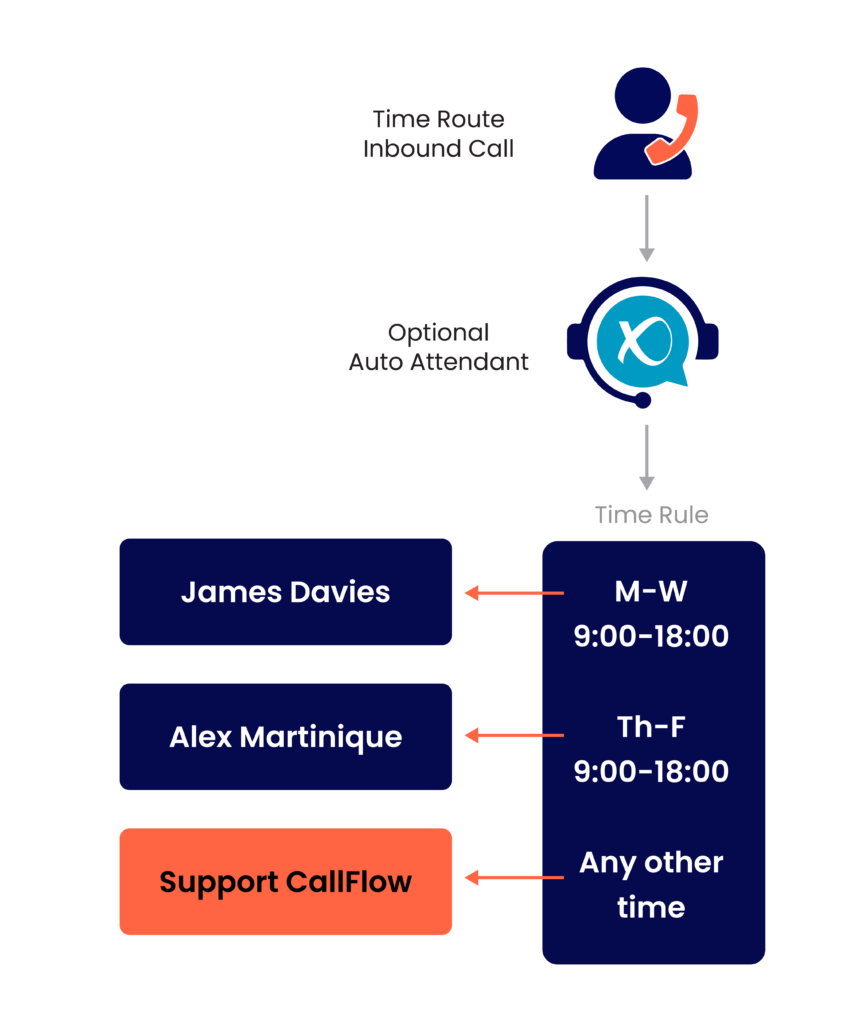
Technically, this feature is nestled under our call flows menu, but time routing can be a component to consider within your call routing configuration options as well. Time-of-day routing changes how calls are handled based on the time of day. This is perfect for businesses with extended hours, shift-base teams, or distributed staff across time zones.
By adjusting call routing automatically, time route helps ensure callers consistently reach the right place or get the right message no matter when they call.
- Routes calls based on business hours or shifts
- Supports remote and multi-time-zone teams
- Improves after-hours call handling
Customer Use Case Examples
Matching The Right Experience For The Call
A regional home repair company wanted to make sure every call reached someone who was certified and available in their area. Using programmable IVR, when a customer called requesting plumbing or electrical services, the system automatically delivered the call to a pool of eligible, certified professionals in the caller’s location. This not only reduced misrouted calls, it ensured customers were connected directly to the right expert, improving satisfaction and first-call resolution.
Personalizing The Call Before It Starts
A subscription-based business serving repeat customers wanted each call to feel personal. With programmable IVR, callers were automatically identified based on their account history in the CRM. Calls could be routed directly to the team managing their account, tagged for priority handling, or greeted with updates and upgrade options relevant to their subscription. This made each interaction more efficient and tailored, strengthening customer loyalty.
Getting Customers To The Right Place Behind The Scenes
A regional bank handled thousands of calls a day and needed smarter routing to manage the volume without frustrating customers. Programmable IVR allowed calls to be directed based on geographic caller data. They could then route calls to the correct branch automatically. The system also escalated high-priority calls from key locations, ensuring important issues are addressed promptly without tying up general lines.
Routing FAQs
Programmable IVR is an advanced call routing system that goes beyond a traditional auto attendant. It uses intelligent call routing logic to direct incoming calls automatically, by caller input, or based on time and day—helping your customers reach the right team quickly and efficiently.
The great news is that you really don’t have to know which one to use. The onboarding and support teams at VirtualPBX can design a routing system for you that fits your business perfectly. Our expert teams will ensure your calls are guided efficiently without one-size-fits-all solutions.
Select route lets callers choose where to go (like “Press 1 for Sales”), while Auto route sends calls automatically based on rules you set from the call data—like availability, caller location, or VIP status.
Yep! Day route and time route work alongside other routing features to automatically adjust call flows by day, date, or time. Together, they create intelligent routing that adapts to your business schedule without manual changes.
Absolutely. Routing can be set by area code, office location, or team availability, making it easy to serve remote staff, multiple offices, or distributed teams seamlessly.
You can set fallback paths with Auto Route so calls always go somewhere—another team, voicemail, or an on-call line. This ensures your customers never hit a dead end, even if someone is unavailable.
Always. Programmable IVR is flexible. You can adjust any and all routing features to tweak the process or reframe it entirely. When you work with the VirtualPBX onboarding and support teams they understand that call flows may need to be tweaked after onset, adjusted based on call data, or reconfigured with internal changes. That’s expected.
Yes. Auto route can use caller data such as area code, country code, or internal status to automatically route calls to the right office, team, or on-call staff, without requiring the caller to press a button.
VirtualPBX offers programmable IVR as part of its business phone system. With Select Route, Auto Route, Day Route, and Time Route, businesses can build flexible call flows that direct callers based on keypad input, location, day, or time. For a broader look at ways to manage and distribute incoming calls, see our call routing features.
Ready to skip the menus altogether?
Meet VirtualPBX AI Employee, your 24/7 receptionist.
While traditional auto attendants get callers where they need to go, customers today prefer to just say what they need through a normal conversation. Instead of making callers navigate a menu, an VirtualPBX AI Employee can be trained as a fully capable receptionist—answering questions, routing calls, and handling requests in plain language, not multiple choice menus.
For a limited time, get a VirtualPBX AI Employee + business phone service for up to 5 people for $99.
Experience It Live Now
Ask Our AI Receptionist Anything
Test response speed and ask product questions in real time. Talk to a human anytime.
Answers on the 1st ring
Talk to our team when you’re ready
More Features Worth Reviewing
CRM Integration
VirtualPBX CRM integrations significantly enhance business communication, productivity, and reporting. Employees can seamlessly make and
API Access
Need a Customized Integration? We’ve Got You Covered. API Access grants powerful capabilities for customers
Data Storage with Amazon AWS
Long Term Storage Through the AWS Integration VirtualPBX delivers long term storage and complete control