

When someone texts your main business phone number, where does that message go?
Customers don’t necessarily stop to think about whether your number is meant for calls, texts, or both. They just see the number on your website, Google listing, email signature, or business card and may send a text expecting someone to see it.
That means forwarding a text can mean two very different things.
If you already have a message on your phone, you can manually forward it to someone else in a few taps.
If customers are texting your business number, you can also automatically forward incoming SMS and MMS messages to an email address, webhook, or both so those messages have somewhere useful to go
How to Forward a Text
Forwarding an individual text is pretty simple on most phones.
How to Forward a Text on iPhone
In the Messages app:
- Touch and hold the message you want to forward.
- Tap More.
- Select the message, or multiple messages, you want to forward.
- Tap the Forward button.
- Choose a recipient and send the message.
Apple also offers a feature called Text Message Forwarding that can make messages from your iPhone available on other Apple devices signed into the same account.
That’s useful if you want to read and respond to your own messages from a Mac or iPad.
How to Forward a Text on Android
In Google Messages:
- Open the conversation containing the message.
- Touch and hold the message you want to forward.
- Tap More, then Forward.
- Choose the person you want to send it to.
- Tap Send.
The exact buttons may vary depending on your phone and messaging app, but the basic process is the same.
You receive a message, select it, and send a copy somewhere else.
That works when the message is already sitting in front of you.
A business phone number creates another question entirely.
What Happens When Someone Texts Your Business Number?
Think about the phone number your business puts everywhere.
Customers call it. It may be on your website, invoices, ads, email signatures, social profiles, or storefront.
Eventually, someone is probably going to try texting it too.
The important part is knowing what happens next. Do those messages even land somewhere? And if they do, is anyone actually watching for them?
A customer could send a question, photo, appointment request, or other message and assume your team received it.
Meanwhile, your team may have no idea it’s there.
Forwarding incoming business texts gives those messages a clear destination and ensures they won’t get lost.
They can go to an email address someone already checks, a webhook that passes them into another system, or both.
Automatically Forward Business Texts to Email
Email is already part of the daily workflow for most businesses.
Forwarding incoming SMS and MMS messages there means someone doesn’t have to remember to check yet another inbox just to find out whether a customer texted the business number.
Maybe all incoming texts should go to a shared email address.
Maybe one business number belongs to a specific department and its messages need to reach that team.
Either way, the customer keeps texting the same business number they already know.
The incoming message simply gets sent somewhere your team is more likely to see it.
Forward Business Texts to a Webhook
Some messages need to go somewhere other than an inbox.
A webhook can pass information from an incoming text into another application or workflow automatically.
That can mean sending a notification, passing the message into a CRM or internal tool, or connecting it to something custom your business has built.
The webhook gives you a way to decide what should happen with the message after it reaches your business number.
And because email and webhook forwarding can work together, the same incoming message can be visible to your team while also feeding another system.
How VirtualPBX Text Forwarding Works
VirtualPBX Text Forwarding automatically routes incoming SMS and MMS messages sent to your VirtualPBX business phone number to an email address, webhook URL, or both.
You choose which VirtualPBX number you want to forward messages from and where those messages should go.
Different numbers can have different destinations, so the forwarding setup can follow the way your business already works.
A main business number can send incoming messages to a general inbox. Another number can forward them to a specific person or team. You can add a webhook when those messages need to connect with another tool or process.
Customers don’t have to learn a new number or do anything differently.
They send a text to your business number.
VirtualPBX makes sure the message goes where you told it to go.
Receive Inbound Texts Without SMS Registration
Not every business needs to send text messages. Sometimes you just need to make sure the messages customers send to your business number don’t disappear.
With VirtualPBX Text Forwarding, you can receive inbound SMS and MMS messages without completing business SMS registration. Customers can still text your business number, and VirtualPBX forwards those incoming messages to the email address, webhook, or both you choose.
If you want to send outbound business texts, you’ll need to register. But if your goal is simply to receive the messages customers are already sending you, Text Forwarding gives them somewhere to go without that extra step.
How to Set Up Text Forwarding in VirtualPBX
Setting up Text Forwarding only takes a few steps.
- Log in to VirtualPBX and open the menu in the upper-right corner.
- Select Messaging.
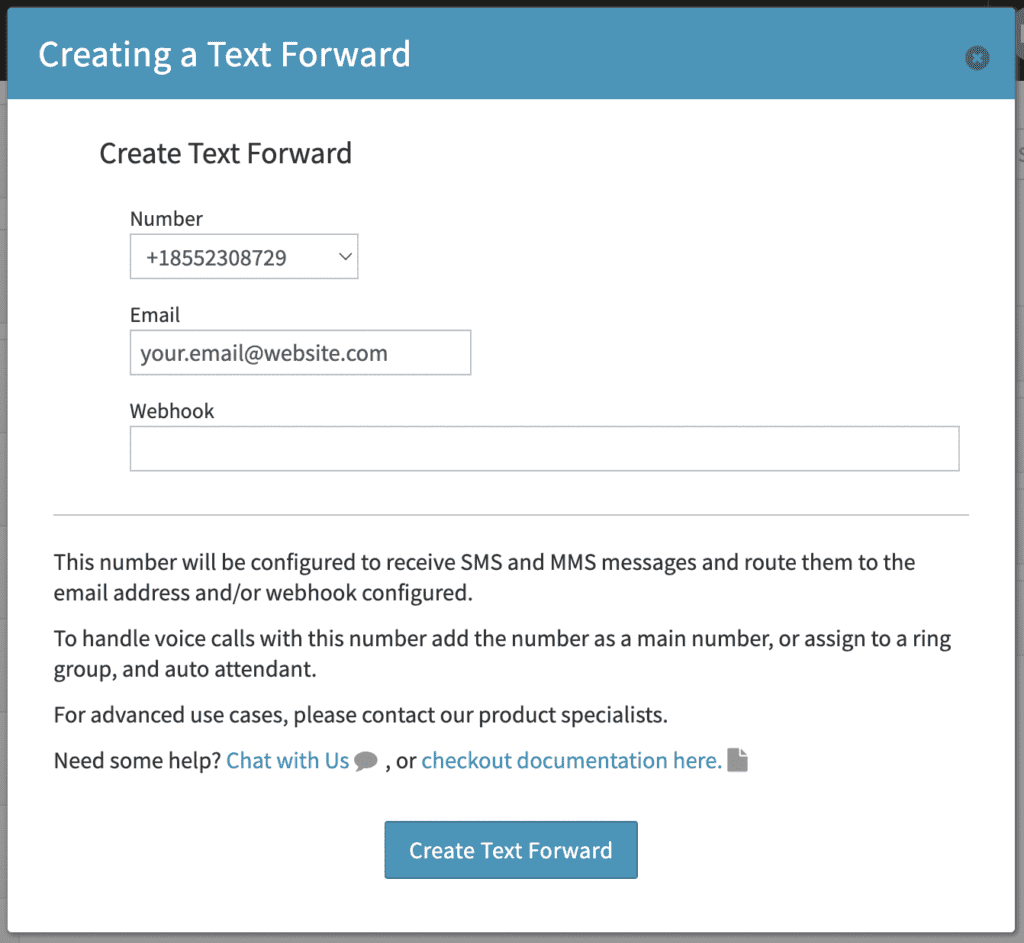
- Choose Text Forward and click Add Number.
- Select the VirtualPBX business phone number you want to forward messages from.
Enter the email address, webhook URL, or both where you want incoming messages sent. - Click Create Text Forward.
Once the rule is active, VirtualPBX automatically forwards incoming SMS and MMS messages sent to that number to the destination you selected.
See Text Forwarding in Action
Give Incoming Texts Somewhere to Go
Your customers already know your business phone number.
If they decide to text it, you shouldn’t have to wonder whether anyone will see the message.
With VirtualPBX Text Forwarding, incoming SMS and MMS messages can automatically go to the email address, webhook, or both that make sense for your business.
Your customers can keep texting the business number they already know, you just make sure those messages have somewhere to go.